

When a non-technical NGO program manager asks, “How many surveys were completed in Pune last month?”, she shouldn’t need a data analyst to write SQL. To solve this, we built Dalgo’s Chat with Data copilot—shifting from a naive single-prompt approach to a stateful, resilient multi-agent architecture powered by LangGraph.
Key Technical Decisions & Lessons:
- One Agent vs. Two: We split responsibilities into a Data Agent (SQL generation, schema context, execution) and a Platform Agent (Dalgo help, KPI/chart creation). Multiple agents were introduced for strict permission boundaries and isolation, not theoretical intelligence.
- Durable State & HITL: Human-in-the-loop approvals are state transitions saved via checkpoints, surviving server restarts and network drops.
- Durable State Repair: Shared state can contaminate agent tool reasoning; fixing this required explicit state repair.
The takeaway: Agents don’t fix poor data foundations—explicit tool boundaries, durable checkpoints, and granular evaluations do.
1. The User Problem: Closing the Gap Between Data and Domain Knowledge
In many social impact organizations, there is a fundamental disconnect between the person who understands the question and the person who can query the database.
Consider a program manager at an NGO in India. She knows her organization’s field operations inside out. She knows that “Pune branch” refers to three specific administrative sub-districts, that survey responses submitted after 8:00 PM are usually flagged for field re-verification, and that last month’s health drive targeted specific maternal care indicators.
When she needs a simple answer—for instance, “How many surveys did we complete in Pune last month?”—she faces a barrier. She cannot write SQL. She does not know how the warehouse normalizes tables, nor should she have to.
[ Program Manager ] (Understands context, lacks SQL skill) │ ▼ (Submits request ticket)[ Data Analyst ] (Understands SQL & schemas, lacks daily field context) │ ▼ (Writes SQL, runs query, exports CSV)[ Answer Delays ] (Takes hours/days for a 10-second query)
Today, answering this question requires a request to a data analyst or an IT staff member. The bottleneck is not a lack of data; Dalgo (our open-source data platform built specifically for NGOs) actively ingests, cleans, and warehouses their operational datasets. The bottleneck is accessibility. The person holding the domain context must proxy their intent through a technical intermediary.
When we set out to build Chat with Data—an AI copilot inside Dalgo—our core objective was to eliminate this translation loop.
We scoped our initial MVP tightly around a defined lifecycle:
- Parse a natural language question from a non-technical user.
- Discover the relevant schemas, tables, and column metadata.
- Generate syntactically correct, dialect-aware SQL.
- Safely execute the query against the warehouse.
- Translate raw tabular results into plain-language explanations.
- Proactively assist the user in converting those results into platform visualizers (charts, KPIs, dashboards).
- Pause for human approval whenever executing an action with external side effects.
We explicitly did not set out to build “an AI that understands everything about an organization’s data.” We knew early on that synthetic AI magic falls apart the moment a database schema is messy or an ambiguous query is encountered. Instead, we aimed to build a deterministic, controllable assistant that could safely bridge the gap between intent and SQL.
2. Before the Architecture: What Do We Mean by an Agent?
Before jumping into framework selection and graph topology, it is worth establishing a practical engineering mental model for what an “agent” actually is in a production system.
Strip away the marketing fluff, and an agent is simply a state loop where an LLM acts as a dynamic control flow decision-maker.

A pipeline like this works well when the steps are invariant. For example, if every user query was guaranteed to be a single-table lookup with explicit filtering criteria, you wouldn’t need an agent. You could simply use a single LLM call with a retrieval-augmented generation (RAG) context payload, parse the output SQL, and execute it.
However, real user behavior breaks deterministic pipelines. Consider the difference between these two requests:
- Query A: “How many surveys were completed in Pune?”
- Query B: “Which districts are performing well?”
Query A is a structured data task. Query B is an open-ended, ambiguous request. What does “performing well” mean? Does it refer to survey completion rates, target vs. actual metrics, or speed of field data collection?
Answering Query B requires:
- Recognizing that the question is ambiguous.
- Inspecting available metrics in the schema to see what performance indicators exist.
- Deciding whether to ask the user a clarifying question or proceed with a default interpretation (and explicitly state that assumption).
- Running multiple queries across separate tables to establish a baseline before comparing district performance.
This is where the agent loop becomes necessary. Rather than hardcoding every possible conditional path in Python, we provide the model with instructions, tools, and a feedback loop. The model observes the environment (schema information, previous query results, error messages), determines the next tool to call, evaluates the output, and iterates until the goal is satisfied or a stopping condition is met.
As detailed in industry references like Anthropic’s Building Effective Agents and OpenAI’s agent design guides, the transition from simple chains to agents is a trade-off. You give up strict determinism in exchange for handling non-linear, unpredictable operational paths.
3. Agent Patterns in Dalgo
When we started building, we didn’t begin with a grand architectural blueprint. We began with simple scripts and added patterns as we ran into concrete failures. Over time, five standard agent patterns emerged as essential to our architecture.
┌────────────────────────────────────────────────────────────────────────┐│ AGENT PATTERN SUMMARY │├──────────────┬──────────────────────────────────┬──────────────────────┤│ Pattern │ Dalgo Implementation │ Core Engineering ││ │ │ Lesson │├──────────────┼──────────────────────────────────┼──────────────────────┤│ Planning │ Router Node (Categorizes Intent) │ Deterministic/lite ││ │ │ beats autonomous. │├──────────────┼──────────────────────────────────┼──────────────────────┤│ ReAct │ Tool Loop (Inspect -> SQL -> │ Model needs schema ││ │ Execute) │ inspection tools. │├──────────────┼──────────────────────────────────┼──────────────────────┤│ Reflection │ SQL Error Retries │ Feed engine errors ││ │ │ back to the context. │├──────────────┼──────────────────────────────────┼──────────────────────┤│ Human-in- │ State Interruption Checkpoints │ Approval is workflow ││ the-loop │ │ state, not UI modal. │├──────────────┼──────────────────────────────────┼──────────────────────┤│ Multi-agent │ Data Agent vs. Platform Agent │ Enforces strict tool ││ │ │ security boundaries. │└──────────────┴──────────────────────────────────┴──────────────────────┘
Pattern 1: Planning
- The Pattern: Decomposing a complex goal into smaller sub-tasks before execution, or routing a request to specialized downstream flows.
- How We Used It: We implemented a lightweight router step at the very top of our graph. Before sending a query to a heavy data-analysis loop, the router classifies the user input into distinct buckets: casual small talk, platform documentation/help, clarification requests, or direct data queries.
- What We Learned: Not every decision needs an autonomous agent. In early prototypes, we tried letting an open-ended agent decide how to begin every response. It frequently over-engineered simple greetings or got stuck trying to find database schemas for general product questions like “How do I add a new user to Dalgo?” A constrained, single-pass classifier acting as a router saved latency, reduced token cost, and prevented agent loops on non-data questions.
Pattern 2: ReAct (Reason + Act)
- The Pattern: Interleaving reasoning steps with concrete tool actions.
Reason (Think about intent) ──► Act (Run tool) ──► Observe (Read output) ──► Reason...
- How We Used It: The Data Agent relies heavily on ReAct when crafting SQL queries. It rarely writes valid SQL on its first pass without looking at the underlying database structure. Instead, it follows a step-by-step path:
list_schemas()to discover available data models.get_table_schema(table_name)to retrieve column definitions and foreign keys.generate_and_execute_sql(query)to run the query against the warehouse.observe_result()to review the returned row set or error string.
- What We Learned: Providing clean, concise schema-inspection tools is far more effective than dumping an entire database schema into the system prompt. High-context prompt dumping degrades model accuracy and increases latency. Giving the model ReAct tools to explore schemas on demand resulted in vastly superior query precision.
Pattern 3: Reflection
- The Pattern: Capturing system or execution errors and feeding them back to the model as context so it can correct its own outputs.
- How We Used It: When Postgres or Snowflake returns a SQL error (e.g.,
column "pune_dist" does not exist at character 34), we catch the runtime exception and inject it directly back into the message history as a tool execution result. The model inspects the error message, realizes its syntax or column assumption was wrong, adjusts the SQL, and re-executes. - What We Learned: This is a lightweight retry/reflection mechanism, not a complex Reflexion framework implementation. Simple error feedback loops resolved over 70% of initial syntax and column mistranslation errors automatically, without requiring human intervention or complex multi-step evaluator models.
Pattern 4: Human-in-the-Loop (HITL)
- The Pattern: Pausing agent execution at designated high-risk nodes and waiting for explicit user authorization before proceeding.
- How We Used It: While read-only SQL queries (
SELECT) can execute automatically, actions that create or modify platform objects—such as saving a generated chart to a public dashboard or writing a new KPI definition—trigger a state pause. - What We Learned: Human-in-the-loop cannot be implemented solely as a transient UI modal on the frontend. If the user closes their browser, experiences a network drop, or refreshes the page, the state must remain paused. Approval must be built directly into the backend workflow engine as a state checkpoint.
Pattern 5: Multi-Agent Isolation
- The Pattern: Dividing responsibilities across specialized agents with dedicated system prompts, distinct state contexts, and restricted toolsets.
- How We Used It: We separated the system into a Data Agent (strictly isolated to data discovery, SQL generation, and query execution) and a Platform Agent (focused on Dalgo operational help, UI management, and visualizer generation).
- What We Learned: Combining all system tools into a single agent degraded performance. As tool count grows, models suffer from tool selection confusion and security risks. Specialization creates a clear separation of concerns.
4. The First Major Architecture Decision: One Agent or Two?
When designing the platform, the simplest initial approach was to build a single, monolithic agent equipped with every tool in our ecosystem:
┌─────────────────────────────────────────────────────────────────┐│ MONOLITHIC DATA AGENT ││ ││ Tools: ││ - list_tables - create_chart ││ - get_schema - create_dashboard ││ - execute_sql - create_kpi ││ - get_dalgo_docs - update_user_permissions │└─────────────────────────────────────────────────────────────────┘
This single-agent approach quickly became problematic during testing.
Tool Selection Confusion
When an LLM is presented with 10 to 15 tools across different domains, accuracy drops. The model routinely confused platform management tools with database exploration tools. For example, when asked “Show me our active users,” it would occasionally attempt to call a platform API endpoint (get_dalgo_users) instead of writing a SQL query against the user activity tracking table in the data warehouse.
Privilege Violations and Security
Different operations carry radically different risk profiles:
- Fetching a schema or executing a read-only
SELECTquery is a low-side-effect operational task. - Altering dashboard configurations, updating platform metadata, or saving permanent KPIs modifies application state.
Exposing administrative and platform-modification tools to the same execution context as read-only SQL tools violated the principle of least privilege. If the SQL generation step were compromised by a prompt injection embedded in a database string, an attacker could potentially access tools designed to alter platform state.
The Solution: Domain Isolation
We divided the system into two distinct, specialized agents:
┌───────────────────────────────┐ ┌───────────────────────────────┐│ Data Agent │ │ Platform Agent │├───────────────────────────────┤ ├───────────────────────────────┤│ Responsibilities: │ │ Responsibilities: ││ - Schema discovery │ │ - Dalgo product help ││ - SQL generation │ │ - Chart/Visualizer creation ││ - Query execution │ │ - Dashboard assembly ││ - Data interpretation │ │ - KPI object management │├───────────────────────────────┤ ├───────────────────────────────┤│ Tools: │ │ Tools: ││ - list_schemas │ │ - search_dalgo_docs ││ - get_table_schema │ │ - generate_chart_config ││ - execute_read_only_sql │ │ - save_kpi_card │└───────────────────────────────┘ └───────────────────────────────┘
This separation was an explicit architectural choice to establish security and operational boundaries. By restricting each agent’s toolset, we improved tool selection accuracy and isolated read-only data exploration from state-modifying platform actions.
5. The Actual LangGraph Architecture
To implement this multi-agent pattern cleanly, we chose LangGraph. Standard chain frameworks struggled with our need for stateful loops, conditional branching, and mid-execution pauses. LangGraph models the system as a stateful directed graph where nodes represent Python function executions and edges define state-driven routing logic.
Here is the exact topology of our parent graph:
                        ┌─────────┐
                        │  START  │
                        └────┬────┘
                             │
                             ▼
                     ┌──────────────┐
                     │  route_node  │
                     └───────┬──────┘
                             │
       ┌─────────────────────┼─────────────────────┬─────────────────────┐
       │ (small_talk)        │ (clarification)     │ (platform_help)     │ (data_question)
       ▼                     ▼                     ▼                     ▼
┌──────────────┐      ┌──────────────┐      ┌────────────────┐    ┌──────────────────┐
│ casual_reply │      │   clarify    │      │ Platform Agent │    │ retrieve_context │
└──────┬───────┘      └──────┬───────┘      └───────┬────────┘    └────────┬─────────┘
       │                     │                      │                      │
       │                     │                      │                      ▼
       │                     │                      │             ┌──────────────────┐
       │                     │                      │             │    Data Agent    │
       │                     │                      │             └────────┬─────────┘
       │                     │                      │                      │
       │                     │                      │              (Handoff required?)
       │                     │                      │              ┌───────┴───────┐
       │                     │                      │              │ (yes)         │ (no)
       │                     │                      │              ▼               ▼
       │                     │                      │     ┌────────────────┐ ┌──────────┐
       │                     │                      │     │ Platform Agent │ │ validate │
       │                     │                      │     └───────┬────────┘ └────┬─────┘
       │                     │                      │             │               │
       └─────────────────────┴──────────────────────┴─────────────┴───────────────┴──────┐
                                                                                         │
                                                                                         ▼
                                                                                    ┌─────────┐
                                                                                    │   END   │
                                                                                    └─────────┘
Breakdown of the Graph Nodes
1. route_node
The entry point after START. It takes the user’s input and passes it through a lightweight, structured-output classifier model. It evaluates intent without executing heavy tool loops.
- If the user says “Hello!”, it routes directly to
casual_reply. - If the question is fundamentally incomplete (e.g., “Show me performance for last”), it routes to
clarify. - If the user asks “How do I connect Postgres to Dalgo?”, it routes to
Platform Agent. - If the query pertains to operational data stored in the warehouse, it routes to
retrieve_context.
2. retrieve_context
Before the Data Agent starts generating SQL, this node fetches structural metadata. It queries Dalgo’s internal metadata layer to pull cached table descriptions, key relationships, and semantic tags assigned to that user’s role. This enriches the agent’s initial state without requiring it to exhaust tools just to figure out what datasets exist.
3. Data Agent
A ReAct loop wrapped in a subgraph. It dynamically calls schema-inspection tools, drafts SQL queries, executes them against the read-only analytical database connection, and evaluates the output. If execution fails due to a SQL syntax error, it loops internally to reflect on the error message and re-draft the query.
4. Platform Agent
A specialized agent subgraph designed for product support and resource creation. It reads data context generated upstream and uses specific UI payloads to render charts, construct KPI blocks, or answer questions about platform capabilities.
5. validate
A final sanity-check node. It parses the outgoing answer generated by the Data Agent to ensure no sensitive raw credentials were leaked, that generated SQL is attached for full transparency, and that tabular results are properly structured for frontend table rendering.
6. The Handoff Problem
In a single-agent system, context is shared implicitly because everything lives in a flat prompt buffer. In a multi-agent graph architecture, moving between specialized agents requires explicit handoff state management.
Consider this common user interaction:
- User asks Data Agent: “How many students enrolled in Pune during the Q3 drive?”
- Data Agent responds: “There were 1,420 students enrolled in Pune during Q3.” (Along with executing the corresponding SQL).
- User follows up immediately: “Great, turn that into a KPI card on my main dashboard.”
Here, the system encounters a domain transition. The Data Agent processed step 1 and step 2 successfully. However, when step 3 arrives, the Data Agent cannot satisfy the request because it lacks dashboard-creation tools. It must route execution to the Platform Agent.
[ User Prompt: "Make that a KPI card" ] │ ▼ ┌────────────────┐ │ Data Agent │ ──► Lacks KPI creation tools! └────────┬───────┘ │ (Triggers Handoff) │ ▼ ┌─────────────────────────────┐ │ State Handoff Payload │ │ - Target: Platform Agent │ │ - Active SQL: SELECT ... │ │ - Result: 1420 │ │ - Context: Q3 Pune Enrol. │ └──────────────┬──────────────┘ │ ▼ ┌────────────────┐ │ Platform Agent │ ──► Executes `save_kpi_card` tool successfully └────────────────┘ without asking user to repeat query details.
If this handoff is poorly managed, the Platform Agent starts with a blank slate and asks: “What metric and value would you like me to turn into a KPI?” This degrades the user experience.
To prevent this, our handoff protocol packages operational context from the Data Agent into a shared state payload:
class AgentState(TypedDict): messages: Annotated[Sequence[BaseMessage], add_messages] active_agent: str last_executed_sql: Optional[str] last_query_result: Optional[Dict[str, Any]] pending_visualization: Optional[Dict[str, Any]]
When the Data Agent identifies that the user’s intent requires platform actions, it appends a structured handoff message to the state graph and yields execution control back to the parent router:
By explicitly passing the last_executed_sql and last_query_result through the shared state graph, the Platform Agent receives the required context immediately. It can generate the KPI configuration payload without re-running the SQL query or prompting the user to repeat themselves.
7. Memory: The Checkpoint Became the Conversation
In standard chat implementations, conversation memory is often modeled as a simple SQL table with a schema like messages (id, thread_id, role, content, timestamp).
While this works for simple conversational bots, it breaks down in complex agentic applications. A plain text history cannot represent intermediate agent state, such as partial tool calls, active execution graphs, pending human approvals, or internal scratchpad reasoning.
In our LangGraph architecture, the state checkpoint effectively becomes the conversation history.
                           THREAD STATE CHECKPOINTS
                          (PostgresSaver / Redis)

  Checkpoint t=0             Checkpoint t=1             Checkpoint t=2
┌────────────────┐         ┌────────────────┐         ┌────────────────┐
│ Thread ID: 101 │         │ Thread ID: 101 │         │ Thread ID: 101 │
│ Node: START    │───────► │ Node: DataAgnt │───────► │ Node: Interrpt │
│ Messages: [M1] │         │ Messages: [M1, │         │ Messages: [M1, │
│ SQL: None      │         │  M2, M3]       │         │  M2, M3, M4]   │
└────────────────┘         │ SQL: SELECT... │         │ SQL: SELECT... │
                           └────────────────┘         │ Status: PAUSED │
                                                      └────────────────┘
Short-Term Memory
We use a persistent PostgresSaver checkpointer tied directly to a unique thread_id for every session. Every time a node in the graph finishes executing, LangGraph serializes the state dictionary (including all message models, active agent keys, intermediate tool responses, and execution variables) and commits a snapshot to the database.
This architectural shift simplifies session management:
- Follow-up questions: When a user asks a follow-up question, we load the latest snapshot for that
thread_id. The model sees previous SQL executions, tool calls, and data outputs as part of its native state. - Interrupt resilience: If an agent execution loop crashes midway through a long sequence of schema lookups, the platform can resume processing from the exact node where the crash occurred, rather than restarting from scratch.
Long-Term Memory
Short-term checkpoints handle active conversation flow within a single session. However, long-term memory across sessions presents different design challenges:
- How does the system remember that when this specific NGO says “active active centers”, they mean
status = 'verified' AND operational_mode = 'full_time'? - How does it remember user preferences for default chart colors or visualization choices?
We distinguish clearly between what is currently implemented and what remains an active area of development:
┌────────────────────────────────────────────────────────────────────────┐│ MEMORY IMPLEMENTATION │├───────────────────┬────────────────────────────────────────────────────┤│ Memory Type │ Implementation Status │├───────────────────┼────────────────────────────────────────────────────┤│ Short-Term │ Fully deployed via PostgresSaver checkpoints ││ Conversation │ serialized per `thread_id`. │├───────────────────┼────────────────────────────────────────────────────┤│ Organization │ Implemented via static schema metadata files and ││ Context │ manual dictionary tagging inside Dalgo. │├───────────────────┼────────────────────────────────────────────────────┤│ Cross-Session │ Active Design Phase: Exploring persistent key-value││ Semantic Memory │ stores to persist entity mappings across sessions. │└───────────────────┴────────────────────────────────────────────────────┘
Currently, organizational context (such as domain-specific column definitions) is loaded dynamically into the context builder via Dalgo’s administrative metadata layer, rather than through autonomous long-term agent learning. Relying on an unconstrained model to self-learn business definitions across sessions introduced too much drift and unpredictable query behavior.
8. Human-in-the-Loop and Durable Execution
In early discussions, “Human-in-the-loop” sounded like a straightforward UI feature: render a modal on the frontend asking “Are you sure you want to save this KPI?”, and if the user clicks “Yes,” send an API call to complete the operation.
However, in a stateless HTTP API model, this approach is fragile:
- What happens if the user closes their laptop screen while the approval prompt is visible?
- What happens if the API backend restarts or redeploys while waiting for the user’s decision?
- What if the user opens the platform on a different device two hours later to approve the action?
A transient UI modal cannot solve these edge cases. Approval is a state transition within the durable execution engine, not a frontend feature.

Implementing Interruption with LangGraph Checkpoints
When the system reaches a node requiring authorization (such as executing a data write or deploying a public KPI card to a dashboard), the node raises a explicit interrupt() directive:
def kpi_creation_node(state: AgentState): kpi_config = state["pending_visualization"] # Trigger graph interruption approval = interrupt({ "action": "create_kpi_card", "details": kpi_config, "message": "User approval required to create permanent dashboard card." }) # This line executes ONLY after state is resumed with approval data if approval.get("status") == "approved": kpi_id = save_kpi_to_database(kpi_config) return {"messages": [TextMessage(content=f"Successfully created KPI Card #{kpi_id}")]} else: return {"messages": [TextMessage(content="KPI creation canceled by user.")]}
When interrupt() is called, LangGraph pauses execution, serializes the current state, saves the checkpoint with a status flag of INTERRUPTED, and releases the execution worker. The system does not leave an active database transaction open or maintain a hanging HTTP connection.
When the user eventually clicks “Approve” in the Dalgo web interface, the client posts an API request to the backend with the corresponding thread_id. The backend restores the state from the last checkpoint, passes the approval signal into the thread, and instructs LangGraph to resume execution from the exact point of interruption.
This approach makes human approval durable. It survives server restarts, network disconnections, and long delays without losing execution context.
9. Observability and Evaluation
Building an agentic system without detailed tracing and evaluation is like deploying software without logging. You cannot fix bad outputs if you can’t trace the steps that produced them.
We separate our monitoring pipeline into two distinct concerns: Observability (tracking system behavior in real time) and Evaluation (systematically measuring output quality).
Observability: What Did the Agent Actually Do?
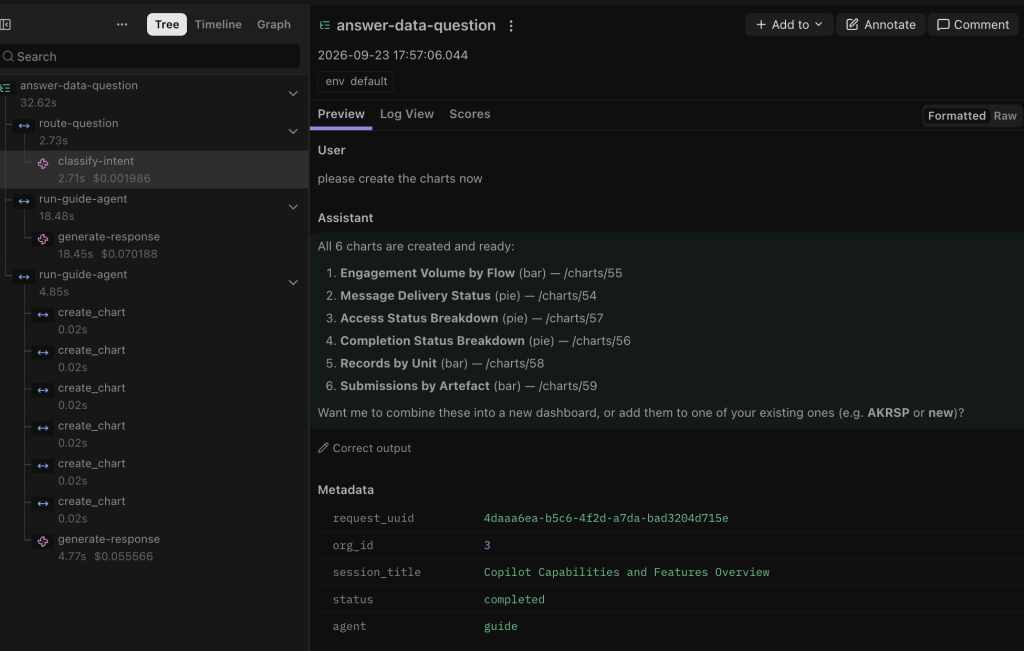
For operational tracing, we instrumented every graph node, tool call, and LLM execution using open tracing primitives (integrated with tools like LangSmith).
[ User Prompt ] ──► [ route_node ] ──► [ retrieve_context ] ──► [ Data Agent ] │┌──────────────────────────────────────────────────────────────────────┴──────────────────────────────────────────────────────────────────────┐│ TRACE METRICS CAPTURED: ││ - Latency per node (e.g., Schema lookup: 120ms, LLM SQL Gen: 1.8s) ││ - Exact System Prompts + Injected Tool Definitions ││ - Exact Tool Call Inputs & Raw Warehouse Returns (JSON/SQL Error strings) ││ - Token Usage & Financial Cost Breakdown per Step │└─────────────────────────────────────────────────────────────────────────────────────────────────────────────────────────────────────────────┘
Real-time tracing was critical for identifying performance bottlenecks. For instance, early iterations showed that the Data Agent was taking over 12 seconds to answer simple questions. Tracing revealed that the agent was redundantly calling list_schemas() and get_table_schema() multiple times in a single loop. We used this insight to add the retrieve_context pre-fetch node, cutting average response latency by nearly 40%.
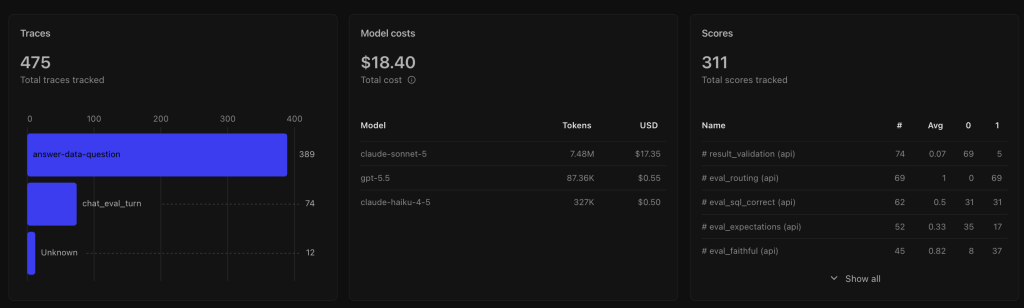
We also now know the cost of using this (roughly) so we can reduce the cost further
Evaluation: Did the Agent Do the Right Thing?
Evaluating agentic text-to-SQL systems requires more than checking whether the generated SQL matches a reference string word-for-word. The same analytical answer can often be produced using different, equally valid SQL constructs (e.g., using a JOIN with a WHERE clause versus a subquery).
Our evaluation methodology relies on three distinct layers:
- Deterministic Execution Checks: We execute both the generated SQL and a golden reference SQL against a test dataset and compare the returned result datasets directly (verifying row count, column structure, and numeric outputs).
- LLM-as-a-Judge Evaluation: A separate evaluator model assesses whether the plain-language explanation accurately summarizes the returned data without introducing hallucinations or ungrounded claims.
- Golden Question Evaluation Sets: We maintain a curated suite of real-world NGO queries paired with ground-truth SQL and expected data formats.
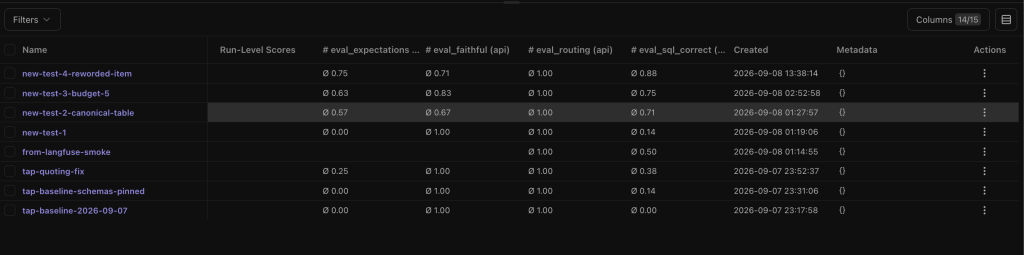
A single overall accuracy metric can be misleading. While simple, single-table queries achieve high reliability ($>85%$), performance degrades on ambiguous questions ($50%-70%$).
Rather than forcing the model to guess on ambiguous inputs, we adjusted the prompt system to prioritize asking clarifying questions over generating low-confidence SQL. An explicit clarification request is considered a successful evaluation outcome, whereas executing a confident but incorrect query is logged as a critical failure.
11. The Unexpected Failure Mode: Shared State Poisoning
One of the most complex technical challenges we encountered during multi-agent testing was a phenomenon we termed Shared State Poisoning.
This failure mode occurs when multiple specialized agents share a common message history array (messages: Annotated[Sequence[BaseMessage], add_messages]), but possess different toolsets.
The Failure Sequence
  ┌──────────────┐
  │  Data Agent  │
  └──────┬───────┘
         │
         ▼
 1. Attempts to invoke `save_dashboard_kpi` tool.
         │
         ▼
 2. Tool Engine Execution:
    "Error: Tool 'save_dashboard_kpi' does not exist on Data Agent."
         │
         ▼
 3. Invalid tool call & error string injected into `messages` state history.
         │
         ▼
 4. Handoff occurs ──► Executing context switches to `Platform Agent`.
         │
         ▼
  ┌────────────────┐
  │ Platform Agent │
  └──────┬─────────┘
         │
         ▼
 5. Reads shared `messages` history payload.
 6. Sees the previous tool error string: "Tool 'save_dashboard_kpi' does not exist..."
 7. Erroneously concludes that `save_dashboard_kpi` is broken or disabled platform-wide!
         │
         ▼
 8. Refuses to call the valid tool, responding to user:
    "I'm sorry, but the dashboard creation tool is currently unavailable in the system."
In this scenario, Agent A made an invalid tool call attempt. The error message was recorded in the shared conversation state. When control handed off to Agent B (which actually possessed that tool), Agent B read the prior error message in the context history and incorrectly inferred that the tool was broken or disabled system-wide.
The Solution: Durable State Repair
To resolve this, we could not simply strip error messages out of the message array in a ephemeral response modifier. Doing so would break the checkpoint execution trace and disrupt downstream debugging.
Instead, we introduced an explicit Durable State Repair node that runs during agent handoff transitions:
                  HANDOFF TRANSITION NODE
                             │
                             ▼
              ┌─────────────────────────────┐
              │ Is handoff between agents? │
              └──────────────┬──────────────┘
                             │
                            YES
                             │
                             ▼
              ┌─────────────────────────────┐
              │ Inspect state `messages`    │
              │ for unhandled tool errors.  │
              └──────────────┬──────────────┘
                             │
                             ▼
              ┌─────────────────────────────┐
              │  Apply Durable State Repair │
              └──────────────┬──────────────┘
                             │
                             ▼
┌───────────────────────────────────────────────────────────┐
│ Inject Context Correction Message:                        │
│ "System Note: The tool call error above occurred under    │
│  Data Agent context. Platform Agent possesses valid       │
│  bindings for 'save_dashboard_kpi'. Proceed normally."    │
└────────────────────────────┬──────────────────────────────┘
                             │
                             ▼
              ┌─────────────────────────────┐
              │ Resume Target Agent Node    │
              └─────────────────────────────┘
The repair node intercepts state handoffs, identifies tool error messages associated with the outgoing agent’s restricted scope, and appends a explicit system message into the persistent state graph before the target agent executes.
By framing state repair as a first-class node in our execution graph, we eliminated state poisoning errors without obscuring historical execution logs.
12. Architectural Principles for Engineering AI Copilots
Building Dalgo’s Chat with Data copilot reinforced several core principles for designing AI systems in production:
1. Start Simpler Than You Think
Resist the temptation to begin with complex multi-agent frameworks, autonomous planners, or nested reflection loops. Start with a single prompt, clear system instructions, and deterministic Python functions. Introduce agents only when non-linear control flow demands them.
2. Use Agents Only for Dynamic Decisions
If a sequence of steps is deterministic, write code for it. Do not delegate standard operational logic (such as parameter parsing or basic routing) to an LLM loop when simple code will do the job reliably, faster, and cheaper.
3. Tool Boundaries Are Critical
Exposing fewer, tightly scoped tools to an agent routinely outperforms giving a model access to dozens of capabilities. Clear tool boundaries improve tool selection accuracy and enforce operational security.
4. Multi-Agent Systems Enforce Boundaries, Not Just Intelligence
The primary reason to introduce multiple agents is often not to increase cognitive capability, but to enforce strict permission models, separate concerns, and isolate operational scopes.
5. State Is an Architectural Core
Once an agentic workflow supports pausing, retrying, handing off, or resuming across sessions, state management becomes a core architectural concern. Treat graph state schemas with the same rigor as database schemas.
6. Human Approval Must Be Durable
Human-in-the-loop triggers should be implemented as persistent checkpoints within the state engine. Designing approval loops as transient UI states leaves the system vulnerable to network drops, app restarts, and session timeouts.
7. Evaluate on Real User Benchmarks
Synthetic benchmarks rarely mirror actual production usage. Evaluate your system against real user questions, domain-specific schemas, and messy real-world data edge cases.
8. AI Cannot Fix Weak Foundations
An AI copilot cannot compensate for underlying data quality issues, poorly designed database schemas, missing access controls, or limited core product UI capabilities. Fix the platform foundations first.
13. Next Steps
Our work on Dalgo’s Chat with Data copilot is ongoing. As we iterate on the system with our partner NGOs, our engineering roadmap focuses on several key areas:
                            ENGINEERING ROADMAP
                                     │
      ┌──────────────────────────────┼──────────────────────────────┐
      │                              │                              │
      ▼                              ▼                              ▼
┌───────────┐                  ┌───────────┐                  ┌───────────┐
│ Semantic  │                  │  Granular │                  │ Context   │
│ Layer     │                  │  RBAC     │                  │ Evaluation│
└─────┬─────┘                  └─────┬─────┘                  └─────┬─────┘
      │                              │                              │
      ▼                              ▼                              ▼
Centralizing domain            Enforcing dataset-             Building automated
definitions & business         level security                 feedback loops between
logic abstractions             within generated               user corrections and
outside the prompt.            SQL queries.                   eval datasets.
- Semantic Layer Abstraction: We are moving away from having agents generate SQL directly against raw database tables. Instead, we are building a semantic layer (using dbt models and structured metric definitions) so the Data Agent queries standardized business logic abstractions rather than raw schemas.
- Granular Dataset-Level Access Control: We are working on integrating Dalgo’s role-based access controls (RBAC) directly into the SQL generation pipeline, ensuring generated queries automatically enforce user-specific row- and column-level security constraints.
- Closing the Eval-to-Development Loop: We are setting up pipelines to automatically anonymize failed production queries and incorporate them into our golden evaluation test suites, ensuring continuous regression coverage as models and prompts evolve.
Conclusion: Building Trust Through Architecture
The main lesson from building Dalgo’s copilot wasn’t that LangGraph made it simple to deploy an agent. It was that using an agentic framework forced us to be explicit about operational mechanics that traditional software often obscures:
- What tools should the system be allowed to execute?
- Where should it stop and request human approval?
- How does it manage state when a tool fails?
- How does it prevent invalid context from corrupting downstream execution?
For an NGO program manager trying to understand her field data, these underlying architectural choices are invisible. She simply sees an input box, submits a question, and receives an answer she can use to make operational decisions.
Building a production data copilot isn’t about creating a chatbot that can converse about tables. It is about engineering a stateful, reliable system that empowers non-technical domain experts to query their data directly—without requiring them to become data engineers first.

