
Intro
Over the last year, the way software gets built has changed — not gradually, but quickly. Teams that have integrated AI into their development workflow aren’t just writing code faster. They’re designing more thoroughly, documenting more decisions, catching issues earlier, and shipping features that previously felt too complex to attempt.
This isn’t a post about hype, or about AI replacing developers. It’s a practitioner’s account of how to actually use AI across the full software development lifecycle — drawn from building Dalgo’s Reports feature end-to-end. And where human judgment remains not just useful but irreplaceable.
I’ve been experimenting with this for about a year, but the last three months is where I really went deep. Here’s what I’ve learned.
0. Choose the Right Tool for the Right Job
Before anything else: AI tools are not interchangeable.
Use Claude for planning, designing, and context management:
- Brainstorming feature approaches before writing a single line
- Running the three-phase design conversation (more on this below)
- Writing and refining technical specs
- Generating Linear or GitHub issues directly from a finished spec
- Running parallel conversations by feature area (Spec, Feature Development, Design Reviews)
- Maintaining long-running project context across weeks of development

- Claude’s Projects feature is the key differentiator here. You can attach your GitHub repo, spec documents, and architecture notes. Every new chat already knows your full project context. You’re not re-explaining your stack, your conventions, or your naming patterns every time. That compounding context is something most in-editor tools don’t replicate well for planning work.
If Claude struggled somehow and you want to use cursor
A concrete example: for the drill-down table feature in Dalgo, I used Claude to build the full plan — data model, API shape, component structure, edge cases. Then took that clarity into Cursor to execute. When I tried to plan and build in Cursor or Claude alone, it kept going off in the wrong direction. The combined approach was better than either tool alone.
1. Start With the Problem, Not the Solution
The most common mistake teams make when adopting AI for development is starting with implementation. They write a vague requirement into a chat window and ask for code. The output is vague code. Garbage in, garbage out.
The better approach: use AI as a design thinking partner before a single line of code is written.
For Reports, the problem framing looked like this:
“Our NGO users spend half a day assembling data every month. Context gets lost over email threads. Leadership sees the metrics but not what was discussed or decided last time. Monthly reviews repeatedly re-explain the same numbers.”
That framing opened a real design conversation — not just a solution generation exercise.
Prompt pattern that works:
“Here’s the problem: [describe user pain]. Here’s my initial instinct for how to solve it: [your idea]. What are the tradeoffs? What have I missed? What would you change — and why?”
2. The Three-Phase Design Conversation
A productive feature design session with AI moves through three distinct phases. Don’t skip ahead.
Phase 1 — Concept Alignment
Describe the problem domain. Let AI propose a high-level approach. Actively challenge it. This is where the best decisions happen — before anything is committed to code.
For Reports, this phase surfaced a decision that shaped everything else: reports needed to be immutable snapshots of dashboards, not live views. If you could edit report layout independently of the dashboard, you’d have two sources of truth and reports would stop being reliable records. That constraint, established in the design conversation, drove the entire data model.
Push back on the first answer. Ask “what are the alternatives?” and “what does this approach break?”
Phase 2 — Data Model Design
Once you’re conceptually aligned, move to data. What are the core entities? What are the relationships? What gets stored vs. computed? What gets frozen vs. queried live?
For Reports: Dashboard → Report → Snapshot → Summary → Comment. Each entity’s job is clear. The snapshot is frozen at creation time. The dashboard remains the editable artefact. Comments attach to the snapshot state, not to any interactive filter view.
These decisions compound. Getting the data model right early saves weeks of migration pain later.
Phase 3 — Contract Definition
Define your API endpoints, request schemas, and response shapes before any implementation begins. Every field with its type, optionality, and meaning. This is where ambiguity costs the most.
A well-defined contract lets frontend and backend develop in parallel, and lets AI generate accurate implementation code later.
When AI challenges your design — listen. During the Reports build, I reached a decision point between two approaches and asked Claude which was better. It explained the tradeoffs clearly. I already knew them, but now I had something I could use to validate thinking and push back with the team if needed. That’s worth a lot.
3. From Conversation to Code: The Planning Workflow
The design conversation produces valuable decisions. The mistake is letting them live only in a chat window. Here’s the workflow that turns a conversation into a spec, a spec into milestones, and milestones into issues — before a single line of code is written.
Step 1: Brainstorm in Claude
For Reports, I started by describing what we were trying to do: freeze a dashboard at a point in time and turn it into a report that users could review, comment on, and share. I wasn’t asking Claude to build anything yet. I was thinking out loud and using Claude to stress-test the thinking.
The questions I asked weren’t vague. They were specific to the problem:
- Why do we need to store the snapshot separately? Can we just query the dashboard data at the report date?
- What chart and dashboard config do we need to store for the snapshot to be self-contained?
- How should we design the data model so that comments attach to the snapshot, not to whatever the dashboard currently looks like?
Claude gave me approaches, explained tradeoffs, and pushed back when my instincts were off. That back-and-forth is where the most important decisions happen — not during implementation.
Step 2: Save the Thinking in a _plan.md file
After a productive brainstorm, ask Claude to produce a formatted summary of what was decided and why. Save it as a _plan.md example file in the project.
This file serves two purposes. First, it’s a record of the reasoning — not just the conclusions, but the tradeoffs considered and the alternatives rejected. Second, it becomes a reusable context. Every subsequent conversation in the project can reference it without re-explaining the thinking from scratch.
This file is intentionally technical. It’s written for engineers who need to understand the implementation decisions at a detailed level.
Step 3: Convert the Plan into a Structured Technical Spec
The _plan.md file is often too dense and too technical to be useful as a shared team document. The next step is to feed it back into Claude and ask it to produce a semi-technical spec — something that explains the what and why at a level a non-engineer can follow, while still being precise enough to guide implementation.
For Reports, this spec covered:
- The core problem and what this feature replaces
- The entity model (Dashboard → Report → Summary → Comment) with plain-language explanations of each
- The interaction rules (time filter frozen, non-time filters ephemeral)
- The permission model across four user types
- The PDF structure
- Open questions and edge cases
This document became the shared reference point for the entire team — engineering, product, and design. Everyone was working from the same understanding of what was being built and why.
Step 4: Design Milestones to Be Independently Shippable
Once the spec was clear, the next step was to structure the milestones. The goal: each milestone should ship real value even if subsequent ones are delayed. This forces you to resolve the dependency graph early and gives you the flexibility to release, get feedback, and iterate before committing to the full feature set.
I asked Claude directly:
“Given this set of capabilities, what is the minimum first milestone that delivers real value to users? What does each subsequent milestone add?”
For Reports, that produced:
- Milestone 1: Create a report, generate it, edit summary, view all historical reports — valuable on its own
- Milestone 2: Collaboration — comment and tag existing users
- Milestone 3: Email sharing — manual send with PDF attachment and link
- Milestone 4: Notifications, scheduling, and scheduled email sending
Each milestone is usable without the next. Once this structure was clear, I asked Claude to include it in the technical spec so the entire team was working from the same plan.
Step 5: Run Experiments Before You Commit
One of the most underrated uses of AI in early feature development is rapid prototyping to validate technical assumptions before writing production code.
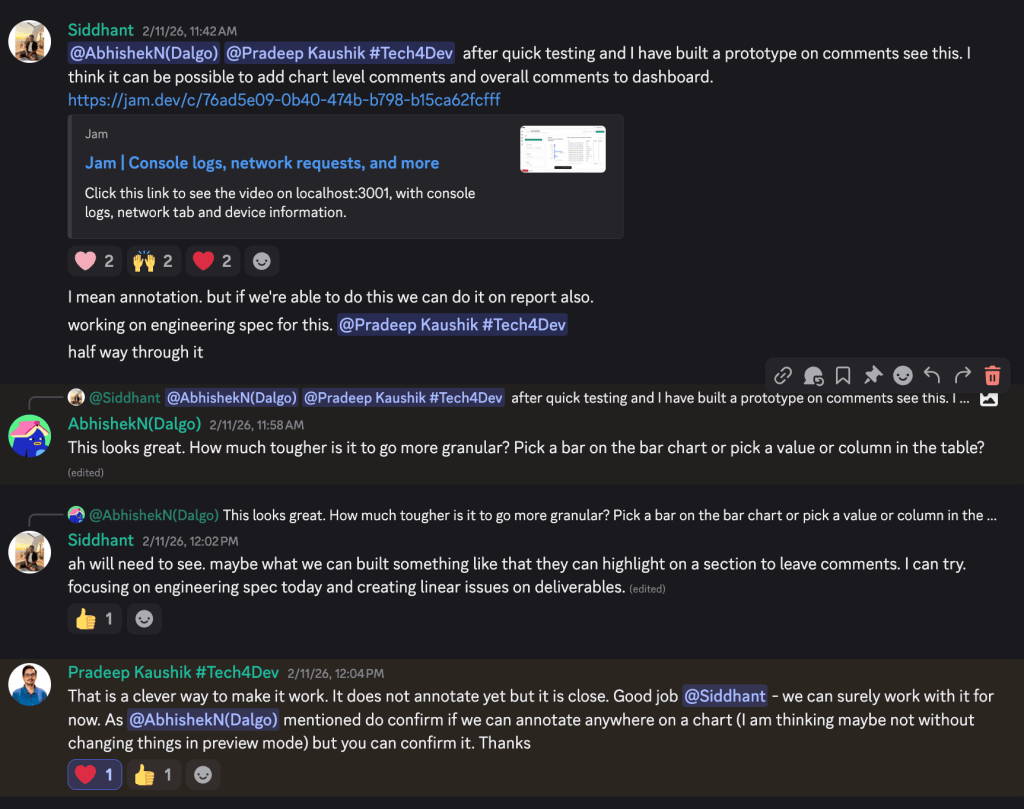
For Reports, we needed to know whether we could support comments on individual dashboard charts — and what that would actually look like. Instead of designing the full feature blind, I used the same brainstorm-and-build method to quickly prototype two approaches: pinning comments directly to chart coordinates vs. attaching comments at the chart component level.
I asked Claude: “Should we use pins or component-level comments? What are the tradeoffs?” It walked through the implications of each — pins allow multiple parallel threads but create visual clutter; component comments are cleaner but less granular. Within a few hours, we had something working well enough to show the team.
Experiment videos –
1. Comment on charts
That experiment gave us confidence we could build it, and gave the team something concrete to react to — not a wireframe, but a functioning prototype. It also surfaced a product decision early: we went with component-level comments, not pins.
This step doesn’t always happen. But when you’re uncertain about technical feasibility or the right interaction model, a few hours of experimentation before committing to an approach is almost always worth it. This could have easily taken up weeks if we had to do it without AI.
This definitely started more conversations from different people and they started to see what we can do more and improve etc. Love this part actually
Step 6: Convert the Spec into Issues in Linear (Project Management tool)
With the spec and milestones defined, the final step is converting them into actionable development issues. This I’m mentioning here bec this used to take a lot of time and we used to spend a lot of time manually creating issues and breaking down problems.
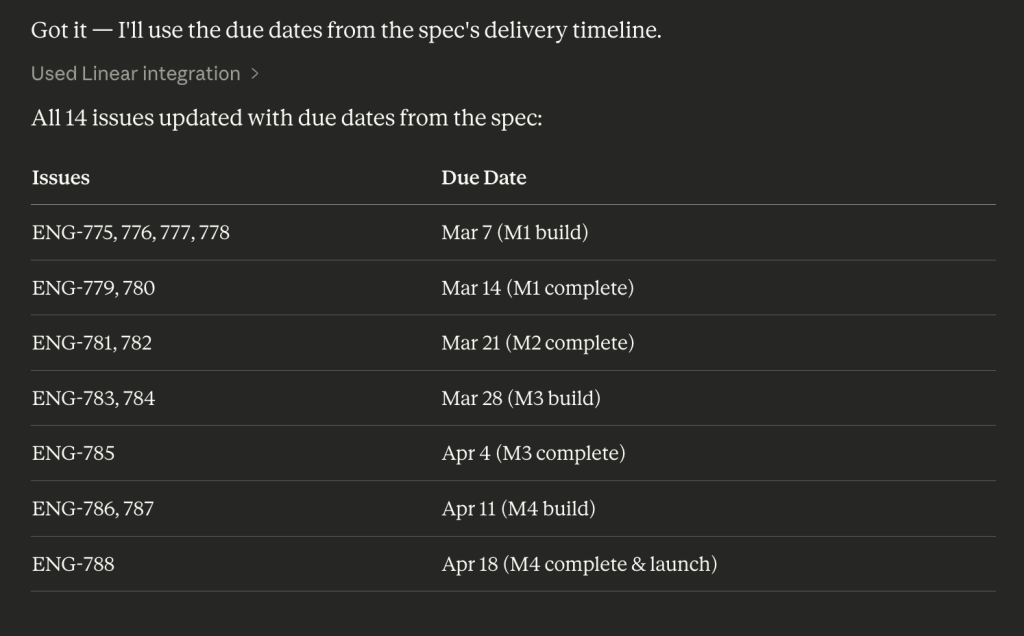
Linear provides an MCP integration that can be connected while chatting with Claude. This makes it possible to create issues directly from the conversation without leaving the chat. Once the specification is ready, feed it to Claude and ask it to generate issues for Linear. Claude picks up the milestone structure and timelines from the spec and organises issues with the right scope and sequencing automatically.
For Reports, the full implementation checklist — reports navigation, create report flow, report view header, snapshot content, interactive filters, comments, version history, external sharing, PDF export, guardrails — became a structured set of issues in minutes. That process used to take an afternoon.
The important human step: review the generated issues before committing. AI may not understand implicit dependencies, team norms around issue sizing, or what’s actually implementable in the time available. Generate first, review second.
The principle: your spec and your issue tracker should always be in sync. Two sources of truth means neither is trustworthy.
4. Where Design Is Irreplaceable
Although we still incorporate elements of design thinking while writing feature specs and during quick prototyping, we haven’t been applying it as deliberately as we did last year. With AI tools now available, there’s an opportunity to reintroduce some of that speed without losing rigor. AI can help us quickly review ideas and generate basic design directions that a designer can then validate. However, it’s important to recognize that AI proposing layouts and a designer validating them against real user behaviour are not the same thing.
Take information architecture as an example. For the Reports home page, we need to decide whether a user should first see a list of report names or the source dashboard. Should historical versions appear as a nested sub-list, or should they require an explicit click to access? These are not just layout decisions — they depend on how users scan interfaces under the conditions in which they actually use the product. AI can propose several structural options quickly, but designers still need to evaluate whether those structures align with real usage patterns.
Another example is communicating system state visually. If a report is a frozen snapshot — immutable and tied to a specific moment in time — the interface needs to communicate that clearly without adding visual clutter. Similarly, if a time filter is fixed versus adjustable, that distinction should be obvious at a glance. If a filter state is ephemeral and will not persist on reload, users should understand that before they invest time configuring it. These visual language decisions need to be defined early, before the components are implemented.
What we do currently
- We write the spec for a feature and then discuss it with the design team.
- The design team then creates an initial flow, which we review and discuss together.
- The designer often spends time exploring possibilities with AI tools and then presents potential design directions to the team.
- Once the design is finalized, we take screenshots from Figma and provide them to Claude to generate the corresponding implementation. In practice, this approach often doesn’t work well and can produce inconsistent results.
What I experimented with
Design tools like Figma can potentially be integrated more directly into the workflow through its MCP connection with Claude. This allows design files to be referenced directly while discussing implementation or reviewing UI decisions. It can help compare design directions, identify gaps between the specification and the final design, and keep implementation aligned with the intended experience. I haven’t explored this deeply yet, but even sharing screenshots and asking for contextual feedback has worked reasonably well so far.

What we can improve
- We can ask Claude to generate design directions with basic UX principles in mind, supported by a predefined context or rule set — similar to the guidelines we already provide when generating code.
- Designers can experiment with AI tools to generate user flows or early design concepts before refining them in Figma.
- We can then spend time validating how closely the implementation matches the Figma designs, and with the help of MCP we could reference the design files directly instead of relying on screenshots.
5. Build in Layers — Always
Good software architecture doesn’t change just because AI is involved. The order in which you build things should remain the same:
- Data model and migrations first — get the schema right before writing a single endpoint
- Service / business logic layer second — pure business logic with no HTTP concerns, fully testable in isolation
- API endpoints third — thin controllers that call the service and return the schema
- Frontend last — reuse existing components wherever possible before building new ones
This is where your specification becomes critical. A good spec gives AI enough structure to generate most of the implementation plan automatically.
The workflow that worked best: use Claude to brainstorm the feature using the user spec, and ask it to break the feature into a clear implementation plan — including schema, API contracts, and validation rules. That planning step usually produces prompts similar to the “precise” example below. Without it, prompts stay vague and output quality suffers.
Vague (avoid):
“Build the report creation API endpoint.”
Precise (use this): Mostly you get this from here Report Planning document
“Build POST /api/reports/ using Django Ninja. Input schema: dashboard_id (UUID, required), name (string, max 100, required), date_field (string, required), start_date (date, optional), end_date (date, required), is_public (bool, default false), schedule_frequency (enum: manual/weekly/monthly/quarterly, default manual). Steps: 1) Validate dashboard belongs to user’s org, 2) Check no duplicate report name within the org (raise 409 if so), 3) Create report record, 4) Trigger snapshot generation as background task, 5) Return ReportResponse schema. Error handling: dashboard not found → 404, duplicate name → 409, missing required field → 400. Follow the pattern in existing dashboard_api.py.”
The difference in output quality between these two prompts is not marginal. It’s the difference between code you can use directly and code you have to rewrite.
6. The CLAUDE.md File — and Why You Need One
This is one of the most underused tools in AI-assisted development. A CLAUDE.md file placed at the root of your repository gives AI permanent, automatic context about your codebase.
1. Dalgo Backend CLAUDE.md
2. Dalgo Frontend CLAUDE.md
The need for this became clear when I joined the engineering team. There was a gap in shared context about how our backend should be structured and what conventions we expected everyone to follow. Me, Ishan, and Himanshu spent time discussing these patterns — what belongs where, what practices to enforce, what mistakes to avoid. We documented all of it in one place.
The result wasn’t just useful for AI tools — it also made onboarding easier. When a new engineer joins, they immediately understand how the backend is structured and the conventions they’re expected to follow.
What belongs in CLAUDE.md:
- Stack and frameworks (e.g., “Django Ninja, not DRF — these have different router and schema patterns”)
- Project structure — where models, services, APIs, tests, and components live
- Key patterns — permission decorators, logging utilities, error types your team uses
- What NOT to do — anti-patterns that have caused problems
- Reusable components — existing services and utilities to use before building new ones
- Security rules — data isolation requirements, auth patterns, what must never be logged
A worked example:
CLAUDE.md — Backend
Stack: Django Ninja (not DRF), PostgreSQL, Celery for async tasks
Project structure:
Models: src/models/
Services: src/core/{feature}/ ← business logic lives here
APIs: src/api/{feature}_api.py ← thin controllers only
Tests: src/tests/
Mandatory patterns:
• Every endpoint uses @require_permission decorator
• Every query scoped to current org: filter(org=user.org)
• Logging: use DalgoLogger, not stdlib logging
• Errors: raise typed exceptions from src/errors.py
Do NOT:
• Write business logic in API handlers
• Write raw SQL — ORM only
• Reference User directly — use OrgUser
Security:
• Every DB query must filter by org: filter(org=user.org) — missing this is an IDOR vulnerability
• Never log request bodies that may contain credentials or PII
After building the Reports feature, every session built on the conventions in CLAUDE.md. The further into the feature I got, the more valuable it became. Update it like your README: when conventions change, it changes too.
We also put this rule so any non developers can also code and submit PR. Since the context is already in place we won’t need to train them on basics
7. Where Developers Are Still Essential
Let’s be precise about where experienced engineering judgment is not just helpful but irreplaceable.
Institutional knowledge. Knowing that a service already exists that does exactly what you need. Knowing which abstraction is the right place to add new behaviour. Knowing that a pattern that looks clean has caused production incidents before. AI has no access to this without explicit context — and sometimes not even then.
Claude can sometimes overthink solutions. It doesn’t always have full context about how the codebase behaves in practice. There were cases where we implemented a pull request based on its suggestions that later turned out to be unnecessary — after reviewing the system more closely, we realised the problem could be handled with an existing pattern or a simpler approach. I picked this from the blog
Before writing new code for any functionality, always ask: “Does something that does this already exist in the codebase? What existing pattern does this most resemble?” New features should be approximately 80% configuration or extension of existing systems, and 20% net new code.
Production debugging. Reading a stack trace with async context. Understanding a race condition in a scheduled task. Diagnosing memory pressure in a long-running process. This is where engineering experience is most valuable and least replaceable.
Stakeholder communication. Explaining technical constraints in a way that leads to good product decisions. Knowing when to push back on a feature request and how to do it constructively. For Reports, this meant running sessions with Bhumi’s team to understand how they actually conduct their monthly OKR reviews — not just what they said they wanted, but how the workflow actually behaves. AI doesn’t know your users, your organisation, or the political context of a product decision.
8. What Next
Areas to Improve / Explore Further
- Writing better test cases with AI
I still need to experiment more with generating test cases using AI. So far, many of the tests have been written manually and they don’t always cover important edge cases. A useful improvement would be to use Claude to generate more comprehensive test scenarios — especially edge cases, failure states, and permission checks — based on the specification or API contract. - Explore MCP integration with Figma more deeply
The MCP integration between Figma and Claude has potential but we haven’t explored it fully yet. It could help reference design files directly during discussions about implementation, reducing the need for screenshots. Product managers and designers could start experimenting with this to review UI decisions and validate implementation against designs more efficiently. - Managing large CLAUDE.md files
As more conventions and patterns get documented, the CLAUDE.md file can become very large. We should experiment with structuring it better – here - Generating user-facing and API documentation with Claude
Claude can also be used to generate documentation directly from specs and code. This could include user guides, API documentation, and internal developer docs. Using AI for this could reduce the time spent writing documentation manually while keeping it aligned with the actual implementation.
Ah! Okay I’m done for now. Will come back again in few months

