
Where It Started
Report creation is where I first started experimenting seriously with Claude — claude.md files, specialized agents, planning a full milestone in advance before touching the code. The workflow that emerged was simple but different from what we’d done before: plan the next week’s work up front, so that when the team sits down to build, the thinking is already done.
What that unlocked was time. Instead of the usual mix of writing code, figuring out architecture, and unblocking each other mid-implementation, most of our engineering time shifted to reviewing code and discussing the best way to approach a problem — the conversations that actually improve the output. The time we weren’t spending on implementation we were spending on testing and validating design decisions before they were locked in.
By the time we got to comments and manual email sending, I was planning those milestones the week before they started. The team would come in on Monday with a clear picture of what needed to be built and why.
⏱ A feature set that would conservatively have taken three months to build end to end — report creation, comments, email sharing, manual sending, PDF generation — shipped in just over one month using Claude. The workflow didn’t compress timelines by cutting corners. It compressed them by eliminating the back-and-forth that usually happens mid-build.
From Experimentation to a Team System
The Reports workflow worked. But it only worked because I was running it. I was experimenting in silos — figuring out what claude.md configurations produced useful output, which agent personas actually changed the code quality, how to structure a plan so Claude could execute it without drifting. Then I’d show the team what to do for that feature.
That doesn’t scale. There was no unified plan that any engineer on the team could pick up and follow independently. The process lived in my head and in a few ad-hoc files. If I wasn’t in the conversation, the workflow fell apart.
Ashwin raised this directly: we needed a proper SDLC cycle — something the whole team could follow, not just reference when I was around. That became the focus of our Bangalore sprint. We took everything that had worked across Reports, identified the parts that were actually load-bearing, and built them into a structured system codified in a new repo: dalgo-core.
The shared Repository
dalgo-core is a separate repo from the application code. It’s the team’s shared AI playbook: commands, agents, skills, and the domain map, all in one place any engineer or PM can run.
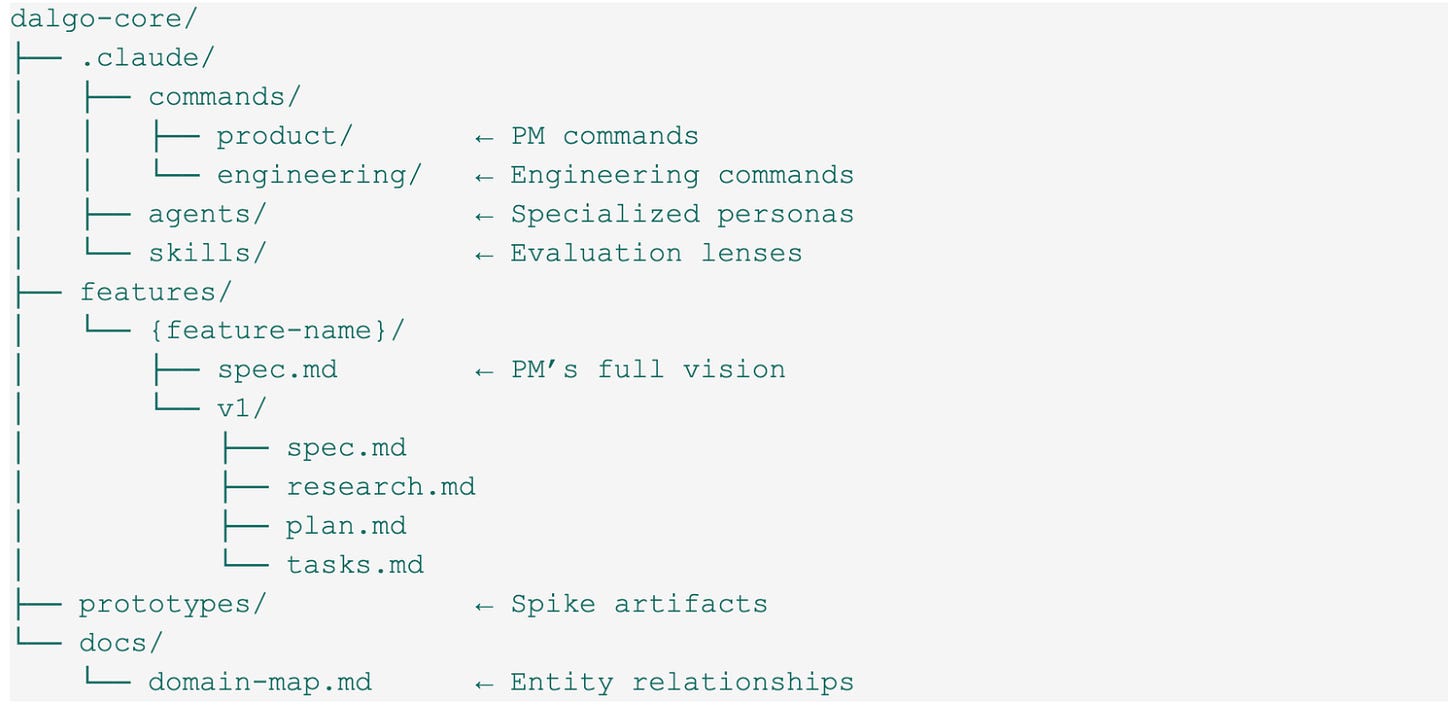
The symlinks to DDP_backend and webapp_v2 mean Claude has access to the actual application code when running any command. The spec, plan, and research artifacts for a feature sit next to each other in features/, versioned by iteration.
A Shared Playbook, Not a Personal Setup
Before we had structure, our AI usage was ad-hoc. A developer would describe a feature in a chat window and start generating code. Sometimes it was great. Often it produced code that didn’t account for how an entity was used in three other places, or a UI flow that made sense in isolation but broke down in the actual user journey.
The problem wasn’t the model. It was the context. A language model writing a feature for Dalgo needs to know:
- What entities are involved and how they relate to each other
- What the existing API and UI patterns look like
- What the spec actually says vs. what was casually described
- What surfaces downstream will be affected when this code ships
We solved this by treating our AI tooling as a structured workflow rather than a chat interface.
Two Workflows, Two Different Jobs
We have two distinct tracks, and the separation is intentional.
The first is for speed and validation. Dalgo works with NGO partners who need to see things to react to them. When someone has an idea — from a client call, from user feedback, from a team discussion — we need to get something in front of them fast, without committing engineering time to something that might not land. This track is built for that: explore an idea, prototype it, validate it with a real user in hours, not weeks.
The second is for building production software correctly. Once something is validated and scoped, it goes through a structured engineering pipeline: research the codebase, write a plan, implement it milestone by milestone, validate against the spec, review the PR. No shortcuts, no assumptions left implicit.
Mixing these two jobs into a single workflow creates the worst of both worlds — too slow for exploration, too loose for production. Keeping them separate means the team can move fast on ideas without compromising how they ship.
1. The PM Track: Spike → Spec
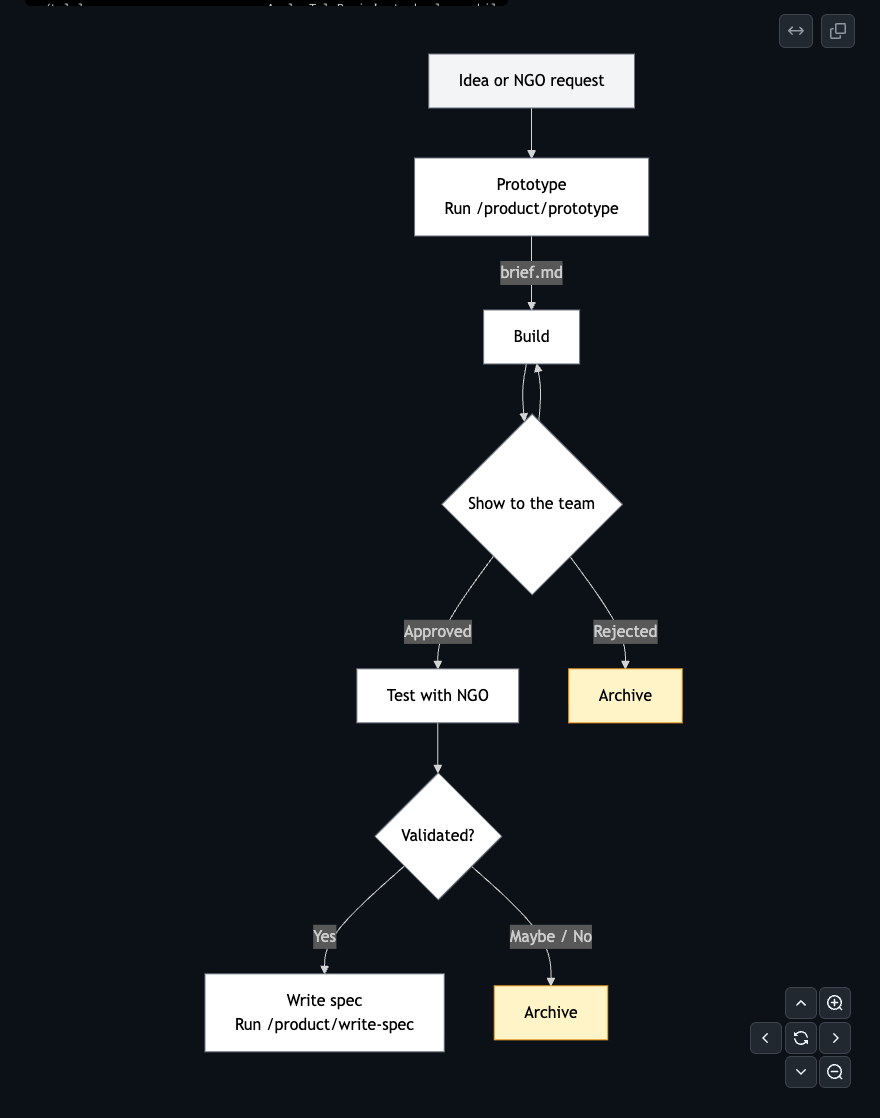
/product/prototype— Validate before committing
/product/prototype "let users schedule report emails"
Produces a one-page brief: the problem in one or two sentences, which user role experiences it, the minimal scope of a testable prototype, where it hooks into the existing code, and how to know if the validation worked.
Get something in front of a real user in hours, not a week of engineering time. If it works, promote it to a full spec. If it doesn’t, archive it and move on.
/product/write-spec— Two modes in one command
Mode A — New spec from an idea:
/product/write-spec "scheduled report emails for dashboard owners"
Produces features/report-scheduling/spec.md — the PM’s full vision. No scope constraints.
Mode B — Scope a versioned iteration:
/product/write-spec features/report-scheduling
Produces features/report-scheduling/v1/spec.md — scoped to a shippable chunk. The “out of scope” section matters as much as “in scope”; it tells the team what was considered and deliberately left for later.
The full spec is the PM’s document. The v1 spec is the engineering contract — hard boundaries, acceptance criteria, handoff checklist. Engineers plan from the v1 spec, not the full vision.
2. The Engineering Track: Plan → Build → Validate
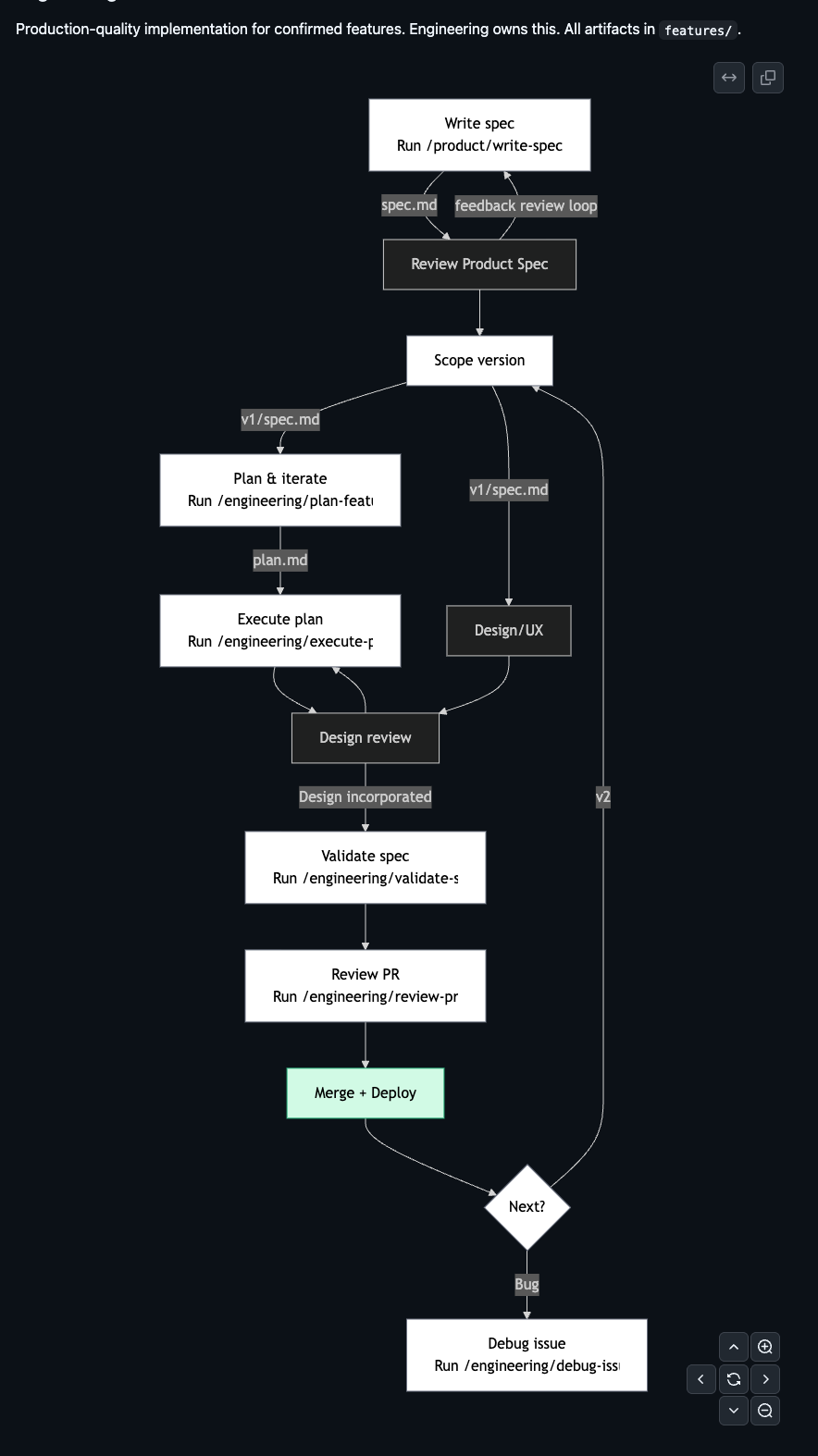
/engineering/plan-feature— Research before writing a single line of plan/engineering/plan-feature features/report-scheduling/v1/spec.md
Reads the codebase first — every relevant model, service, API endpoint, UI pattern — then produces:
- research.md — existing models and fields, service class methods, API routing conventions, test patterns, third-party configurations
- plan.md — HLD (system architecture, blast radius table), LLD (every file to create or modify, schema designs, API signatures), security considerations, test plan, milestones
The plan is a draft. Engineers iterate on it through conversation before a single line of code is written. The plan is done when the engineer is confident in it, not when the command finishes.
/engineering/execute-plan— Implement with checkpointing/engineering/execute-plan features/report-scheduling/v1/plan.md
Creates tasks.md for progress tracking. Implements milestone by milestone. If it stops mid-way, the tasks file is the resume point.
/engineering/validate-spec— Spec check before the PR/engineering/validate-spec
Walks through every acceptance criterion in the v1 spec and verifies it’s met. Read-only — reports gaps, doesn’t change code.
/engineering/review-pr— Structured code review
/engineering/review-pr 142
Checks service-specific conventions (Django Ninja patterns, Next.js App Router, SWR usage), security, test coverage, breaking changes. Outputs a review for the engineer to act on.
/engineering/debug-issue— Structured debugging
/engineering/debug-issue https://sentry.io/issues/DALGO-123//engineering/debug-issue "500 on /api/v1/organizations/"
Traces the bug through the stack, forms hypotheses ranked by likelihood, reads the relevant source, proposes a fix with a regression test.
The Domain Map
The whole system depends on one underlying document: a written-down model of how Dalgo’s product entities relate to each other.
docs/domain-map.md describes every entity — Chart, Dashboard, Metric, KPI, Pipeline, ReportSnapshot, Alert, Notification — and how they connect. Crucially, it captures how relationships work, not just that they exist. An embed relationship means live rendering — upstream edits appear immediately. A snapshot-of relationship means a frozen copy — future changes don’t flow. A query-from relationship means schema changes in upstream break it silently.
When /engineering/plan-feature runs, it traverses this map from the entities being changed, checks what’s downstream, and uses those relationship types to decide what needs explicit engineering work and what’s inherited automatically. The output is a blast radius table in the plan.
For Metrics & KPIs v1, the traversal caught that ReportSnapshot needed explicit work two hops away from Metric — something that would have been discovered as a bug without the map.
The map also surfaces facts invisible in code. ReportSnapshot freezes layout at snapshot time but queries data live — meaning a Metric formula change retroactively alters numbers in historical reports. That’s a stakeholder-trust issue that deserves explicit call-out in any plan touching Metrics.
The Agents
Commands handle the workflows. Agents handle the judgment calls. Four are available — Claude invokes them automatically based on context, you don’t run them manually.
- senior-product-manager — Carries Dalgo’s full product context: 20+ NGO partners, small engineering team, tight budgets, non-technical users. Applies a specific evaluation framework before writing any spec: Does this reduce manual spreadsheet work? Can a non-technical user operate it without developer support? What’s the support cost for the team?
- debugger — Four phases: Gather → Hypothesize → Isolate → Fix. Runs on Opus — bug diagnosis is the task where model quality matters most.
- ux-design-expert — Knows Dalgo’s design system: Shadcn UI, Tailwind CSS v4, 16px base typography minimum, 44px touch targets. Key constraint: Dalgo users are on slow internet and old devices. Designs that look fine in Chrome on a MacBook often break on a mid-range Android phone on 3G. That changes layout decisions, progressive disclosure, and what goes above the fold.
- ngo-data-platform-consultant — Runs as “Priya,” a non-technical NGO program manager with eight years of field experience: comfortable with Excel, no knowledge of SQL or data pipelines. Evaluates every proposed flow: Can I understand what this does within 10 seconds? Will I be afraid of breaking something? Can I use it in my 30-minute morning check without calling a developer? This agent exists because features that are technically correct but confusing to real users get abandoned after three days. Priya is the forcing function.
The Skills
Skills are focused context files — they load the right knowledge for the task at hand rather than dumping everything into every conversation.
This came out of a real problem. Early in the Reports work, everything lived in a single claude.md file: backend conventions, frontend patterns, design constraints, agent context, documentation guidelines. It worked until it didn’t. As the file grew, Claude’s attention spread thin. Backend guidance surfaced in frontend tasks. The context that was supposed to focus the model was diluting it.
The fix was to break it apart into scoped skills loaded only when relevant:
- backend_architecture — Django Ninja patterns, model conventions, service layer structure, API routing, migration discipline, test patterns. Loaded for any backend-touching command.
- frontend_architecture — Next.js App Router conventions, SWR data-fetching patterns, Shadcn UI usage, Tailwind v4 constraints, component structure. Loaded for any frontend-touching command.
- generate-docs [Demo] — How to read the codebase, understand what a feature does, and produce user-facing documentation grounded in actual code rather than assumptions. Loaded when generating or updating docs.
Alongside those, two evaluation lenses:
- design-review — Runs a UI through two perspectives simultaneously: UX expert and NGO user. Used when a component needs structured feedback from both angles at once.
Backend planning loads backend_architecture. Frontend review loads frontend_architecture. Documentation generation loads generate-docs. The model gets the right context for the task, not everything at once.
What This Has Produced
The Metrics & KPIs feature was the first full run through the complete pipeline:
- A full spec that called out six things explicitly out of scope — saving the team from scope creep on four of them during implementation
- A research pass that identified shared function needed by the report system before a single line was written, avoiding a divergent implementation
- Tasks tracking that made a four-milestone implementation resumable across sessions
- 246+ backend tests passing at merge
But the bigger result is what it’s unlocked beyond engineering.
The design team is exploring how to bring Design MCP, agents, and the skills we’ve set up into their own review and handoff process. The product team is experimenting directly on Dalgo — building things to show NGO partners, then iterating on their own commands, skills, and agents to get better spec output. The consulting team has started building their own workflows entirely separate from engineering: their own agents, their own commands, their own way of working.
What used to be an engineering-only system is becoming something the whole organisation is building on. Consulting, product, design — anyone can now prototype an idea on Dalgo, get it in front of a client, and iterate before a single line of production code is written.
What took months now takes days. Not because corners are being cut, but because the thinking, the validation, and the iteration are all happening before the build — not during it.
Reports: What We Shipped
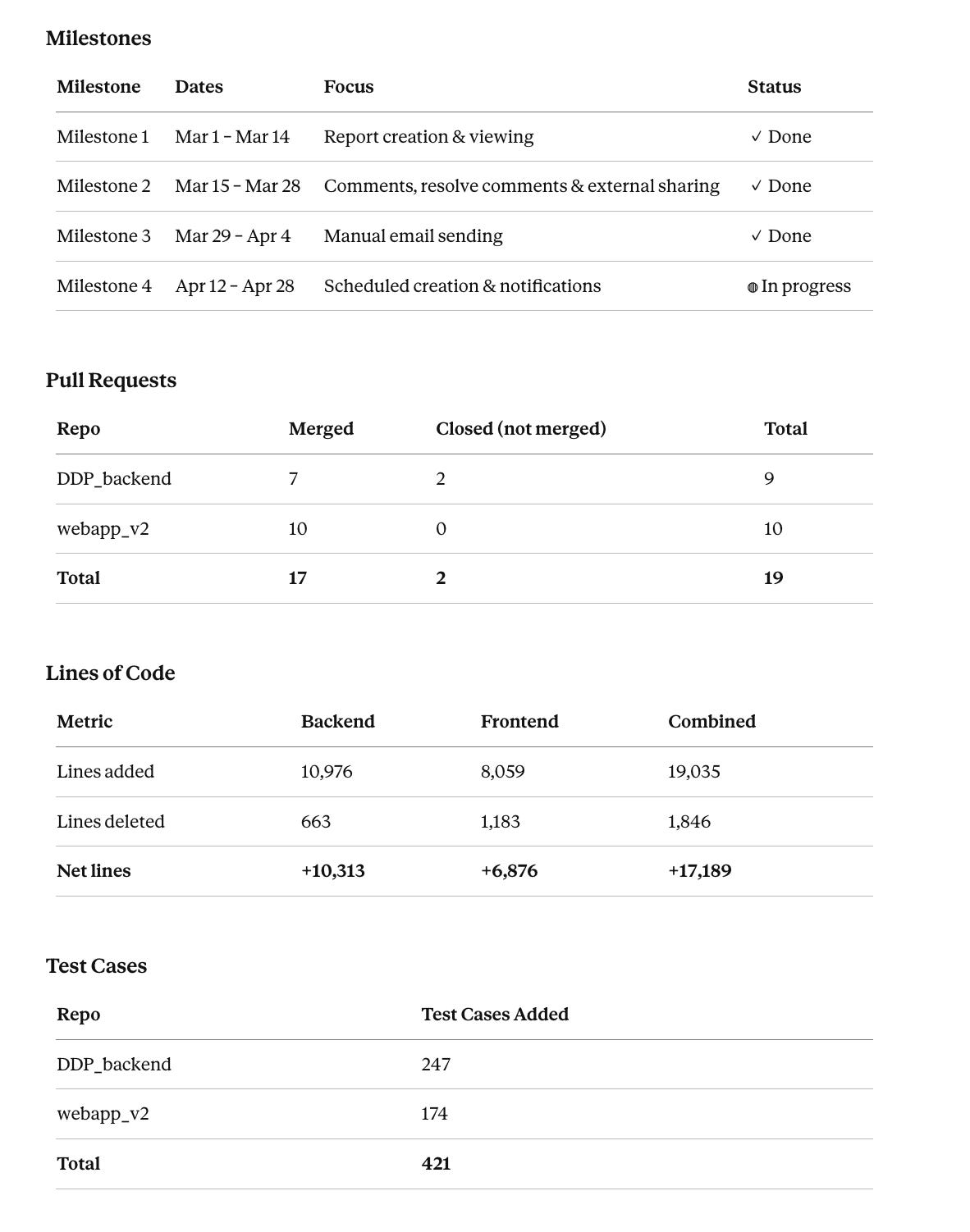
The Reports feature ran through all four milestones across March and April. We closed everything except scheduled creation — plus a set of enhancement PRs on top of the planned scope. A comparable feature set built the traditional way would have taken at least three months. This took just over one.
What I’m Doing Next
The system is running. I’m not waiting for one feature to close before starting the next one. Right now I have multiple agents working in parallel on different problems, and I’m reviewing their output in the time I’d previously have spent writing the first draft.
My usage across product, project management, running agents, and working on multiple problems simultaneously has increased significantly in the last two to three months. This is what that looks like from Claude’s side (But I also use max account for development and this is just all the different experiments I did):
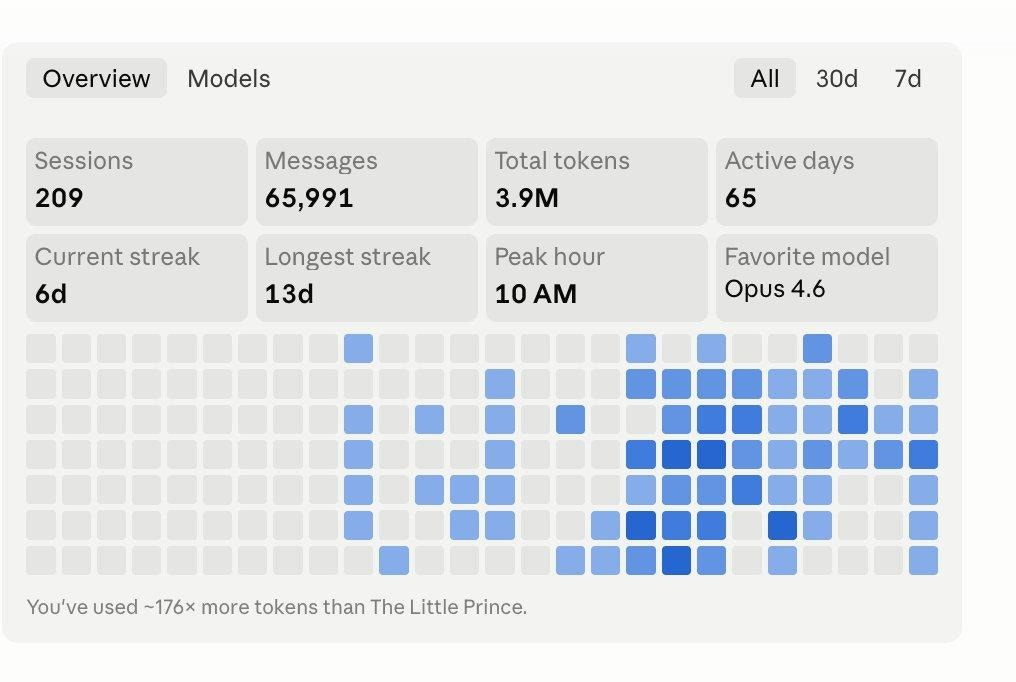
209 sessions. 65,991 messages. 3.9M tokens. 65 active days. 176× more tokens than The Little Prince.
Parallel Agents Running in Local Worktrees
- Report SchedulingAlready planned and in review. The spec is done, the engineering plan is drafted, and I’m going through it in my free time before we hand it to the team.
- RBACI’m working on the product spec and have shared it with the team for review. A separate agent is running the engineering plan in parallel — by the time the product review is done, the engineering side will be ready to go.
- Automated User DocumentationAn agent has taken an idea and built it into a working solution. Give it access to the repo via Claude Desktop and it figures out what feature was built, then generates user documentation grounded in the actual code. I’ve added skills so it stays accurate rather than hallucinating UI flows.How it works: it goes through the code, understands what needs to be documented, and can automatically add screenshots for simpler flows. For more complex flows, screenshots can still be added manually. You can also point it to a PR — if documentation-related changes happened there, it will either update existing docs or generate new ones.
Live Reports documentation is already published at dalgot4d.github.io/dalgo_docs/docs/reports using this pipeline. Command: generate-docs.md in dalgo-core.
- Backend Test CoverageAn agent is currently working on pushing backend test coverage to 80%, and I’m reviewing the output now with plans to ship this over the next few weeks.What’s been especially interesting is the workflow: I spun up five agents in parallel, each on its own worktree, focused on different features and test cases. They all merged their changes into a single branch and opened one PR for me to review.The PR is still in progress, but even at this stage it has cut the effort from what would have been weeks of hands-on work to just a few days of focused review.
- Sentry AutofixAn agent is working on improving Sentry notification quality and exploring whether it can autofix small issues and open a PR for the team to review in the morning. Still in the planning stage but the direction is clear.
I’m constantly thinking about what else I can do and what workflow I can improve for the team. I’ve started chatting with different people in the team to learn about their process. Will come back to this once I’ve something solid to show.
One more thing. I’ve been thinking about which models to use for which tasks and how to use fewer tokens without losing output quality. My next post will be on that.
That’s it for this one.
