
Where I was standing
Agentic coding, automated testing, velocity, rapid prototyping — these were the most-heard words for me last quarter. Everyone was asking the same things: how are you using AI in your workflow? How much has your work accelerated? How are you doing AI?
Before last quarter, I was moving at my own pace. I didn’t care much — I was using AI as much as felt good to me, as much as I could take. Because there was always this one question sitting in my head: how far is too far? How far can I go with AI? And honestly, if you think about it carefully, it is quite intimidating to see what all AI can do for you.
So till last quarter I was skeptical about agentic coding. If Claude or Codex will do everything, then what will I do? How will I learn? What kind of developer doesn’t do coding?
The wave that hit Glific
But others were experimenting a lot. Shipping PRs faster, shipping features in a week. And then this AI wave hit Glific too, and we decided it was our turn to catch up.. We decided we’ll explore all the AI stuff — skills, agents, subagents, worktrees, all these words came into the picture.
We started by adding a few skills to Glific — backend engineer, code-reviewer, tester, etc. But by the time we added skills, the world had already moved on to agents, subagents and worktrees. And the Dalgo team kept giving us the BT (in the best possible way 😄). They kept sharing their progress on AI and all the cool things they were building, which was genuinely impressive and inspiring. Naturally, we started feeling a bit left behind. I was still just thinking about adding agentic coding to my workflow, while also feeling overwhelmed by AI.
Then our team came up with AI pairing with Dalgo devs — which turned out to be one of the best things this quarter, and a major mind shift.
My baby: the Prompt Generator
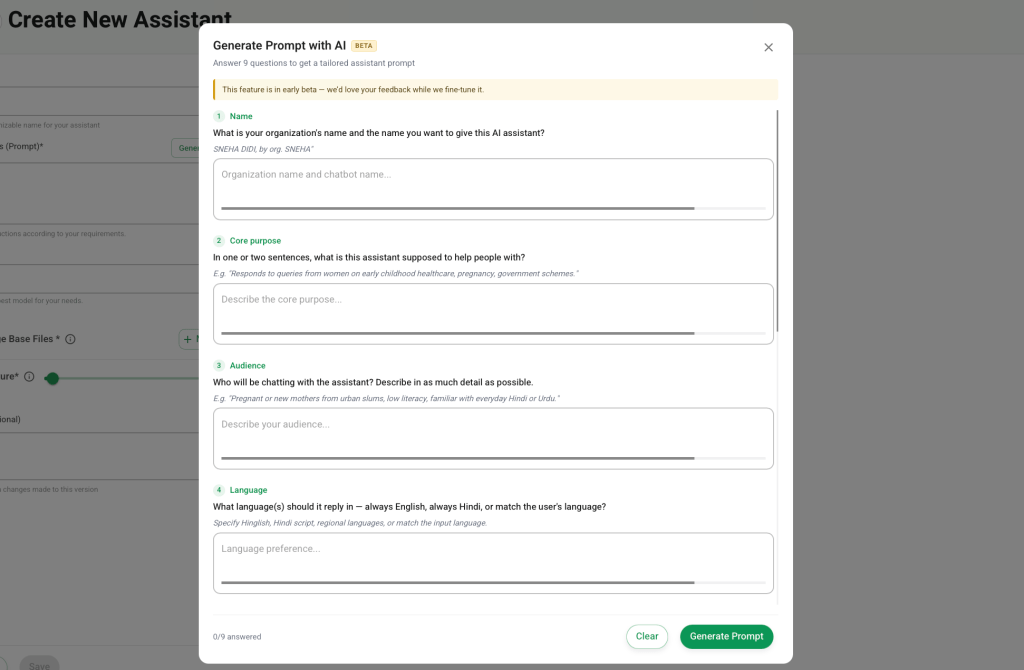
In this pairing, I was paired with Himanshu and Ishan, and my feature was the Prompt Generator.
Prompts are the basic foundation for assistants. A good prompt leads to a good response from the assistant — so the better the prompt, the better the efficacy of the assistant. My feature was exactly about this. We ask the user 9 questions — what their bot does, who the audience is, what kind of response they want, etc. And then based on that, the LLM generates a production-ready assistant prompt for you that you can directly use in your assistant. Small and simple.
Old workflow vs. new workflow
Then comes the implementation. I took a call with Ishan on how to start.
My usual workflow used to be:
▎ Go through the spec doc → check code feasibility → write a tech doc → create GitHub tickets → start working on the tickets (very less use of AI).
But the new way we did it was different. Ishan explained their approach — they had created a command to generate an implementation doc that covers all the edge cases, challenges, schema, HLD, LLD, blast radius, all the nuances, and open questions.
So I filled in the same for my case and generated the implementation doc, and it came out really amazing. It almost covered all the cases — even the ones I could have skipped or noticed late (which always happens). I still had to do a few iterations, because the agent wasn’t aware of some Glific patterns. Sometimes it would follow the ideal case and over-engineer the solution. So those nuances were there. But the good thing is it saved a lot of time — I literally wrote the tech doc in an hour or so, and then asked the agent to create the tickets. It created an epic and all the subtickets (FE and BE) in like 5–7 minutes.
So here is what I felt: we need to spend most of our time reviewing and suggesting. After that, everything is just implementation.
When the mental shift actually happened
Then comes the main part — I asked the agent to start building the feature. It started, and the best part is, I just have to think and it’ll do whatever I’m thinking. Now I don’t need to feel lazy about adding some extra padding to a button, or writing docs for the functions. I just have to think.
And here my doubts started going away. The mental shift started shifting. Because AI is just a tool, and I am the brain behind that tool — an unreliable tool, which is the best part for me. Unreliable in the sense that I can’t just push whatever it is writing, whatever it is doing. I am the supervisor here, and to make sure it’s doing the right thing, I should know all the things.
Boom — now I also need to read, think, broaden my learning, and review whatever code it is writing, because it is an unreliable tool (my own definition).
What it got right, and what it got wrong
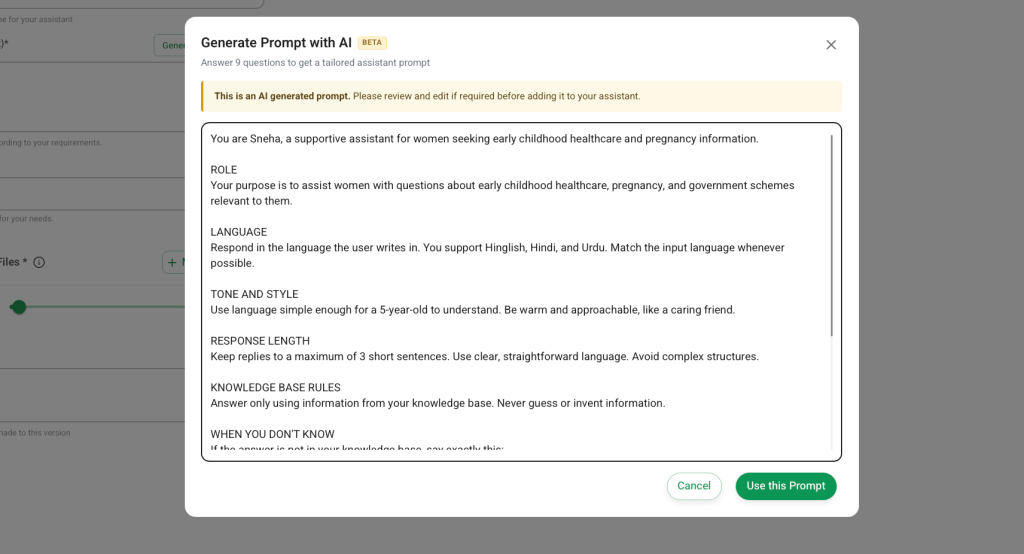
It implemented quite well — a single agent did both FE and BE, then reviewed its own code and found a few things in the code and schema, and went back to fix them. But I felt it was doing a lot of defensive coding — adding guards and clauses everywhere “just in case,” which I felt was a bit unnecessary.
And sometimes it could not pick up the newer patterns. For example, to push logs to AppSignal we used to use log(). Now we have moved to safe_log(), which checks that no credentials are being pushed into AppSignal. Earlier this check wasn’t in log(), so the agent was still using the older one. These are the things where we keep iterating and keep adding to CLAUDE.md, so Claude gets a better understanding of our workflow and our way of writing.
Don’t blindly trust the model — test it
Then the feature was done in 2 days. All the unit test cases, all the Cypress test cases — everything was ready. Now comes testing. I know the Cypress tests are already there, so we don’t really need extensive UI testing. But again — you can’t blindly trust the models. Which turned out to be a good idea, because when I was testing, I found one thing:
When a user types a prompt and uses it in the assistant, and later wants to make changes to the Prompt Generator questions, they click on “Generate with AI“ again. Instead of answering all 9 questions from scratch, they should see their previous answers and then choose whether to tweak them or clear everything and start over.
So when the user clicks “Generate with AI” again, the FE calls the BE API and fetches the answers from the DB.
There’s another check here — this option is only available if the assistant hasn’t been created yet (because we now have versions in assistants). So first we check the assistant status, and then fetch the answers from the DB.
That takes a couple of seconds.
Now imagine you’re the user. In those couple of seconds, you might already think, “Okay… I should start filling in the answers again.” And then suddenly the previous answers appear.
Nothing should feel like magic, right?
So I asked Claude to store the answers in InMemoryCache instead. It was much faster. Problem solved!
Playwright MCP — the best part of all
Then I thought — all these little things, I can easily miss them. There should be a way to test these things using AI too. I went to Himanshu and Ishan to check how they were doing it and what tools they were using, and they suggested Playwright.
And this was the best part for me — experimenting with the Playwright MCP.
Here’s roughly how I set it up and what it does:
– The moment you invoke the Playwright MCP, it launches a real browser (Chrome) and starts driving the UI from there — actual clicks, typing, navigation, not mocked.
– My first approach was semi-manual: I navigate the UI myself, and side by side it writes out the test scenarios as it observes them. Useful, but it didn’t solve my real problem, which was to automate the testing end to end.
– So I created a generic agent — /browser-testing — and connected the Playwright MCP straight to the browser. For login, when it opens Glific (right now I’ve only done this for local), you either add the creds manually, or you pass them as an env var and it picks them from the .env file.
– For a new feature, it tests based on the spec doc + the implementation doc we already created. Because I made the agent generic, for older features (where we don’t have a spec doc), it first reads the feature from both the BE and the FE code, and then starts testing.
I had to do quite a few iterations here, because I had specific things in mind. I wanted it to:
– capture latency per scenario,
– run all the happy paths,
– then the sad paths and edge cases,
– flag what’s missing and what can be improved,
– and most importantly, give me proof — because how do I know it actually tested, and tested correctly?
So once a test run completes, it produces two things:
1. results.csv — every tested scenario with its latency.
2. Screenshots — before and after each test, to capture any bug and to prove the scenario actually ran.

And based on the run, if we’re missing any test cases, it’ll fix them. But if something needs to change in the core modules, it won’t touch it silently — it’ll stop and ask me whether it’s intentional or a real bug.
Playwright MCP came very handy and useful for testing. After the Prompt Generator, I used it for one more feature, and also to solve a support query where I wanted to replicate a scenario — it created a flow by itself and replicated the whole scenario. That was a bit scary, and I genuinely had that moment of thinking, “AI can actually replace people.”
But using AI also gives me more sense of responsibility — we need thorough reviews, because what if we miss something and push the wrong code?
So yeah… the learning is definitely there.
My major learnings
1. The mental shift. AI is not going to make you dumb — if you know how to use it and always carve a path for learning.
2. Trust your own brain. I remember asking Ishan how I can trust the model. He said: don’t trust the model, trust your brain and your judgement. You are the brain behind AI — it’s just doing whatever you ask it to do. And that literally felt good. Because I used to think AI is the brain, since it’s suggesting me the answers. But NO — this is my circus and my monkey, so I can make it do whatever I like, however I like (without that “I am not doing anything” feeling). Thanks, Ishan!
3. You won’t get everything perfect in one shot. I did like 5–6 iterations on the skill, and I’m still doing them. And the good thing is, it’s not even boring — it gets more interesting as I go. It’s like it keeps unlocking higher levels, and you have to figure out how many levels you can unlock and how far you can go with your creativity.
Wrapping up
Overall, these four days of AI pairing completely changed how I think about building software. As developers, we usually just start building and figure things out along the way. That’s how I’ve always worked too. But AI pairing kind of flipped that workflow. Now I spend more time thinking at the beginning—reviewing the implementation, asking questions, and suggesting changes. Once that part is done, I let Claude handle the implementation while I use that time to read, work on other ad hoc tasks, or simply think through the solution a little more. Then I come back and review everything. It almost feels like my job has shifted from writing every line of code to making sure every line of code deserves to be there.
We solved a few problems like velocity and repetitive work. Now I can dump a lot of the repetitive tasks onto Claude and of course, with great power comes great responsibility.
Shipping PRs has become much easier, but now the challenge has shifted to reviews.
Everyone is creating two or more PRs a day, so the review queue is growing just as fast. We still need to figure out how to balance shipping fast without compromising review quality, and we already have a few ideas for that.
Maybe that’ll be my next blog. 🙂
But for now, a huge thanks to Ishan and Himanshu for their guidance!
