
In the past few months since Sashakt was released for production use, more than 25,000 beneficiaries have used it to take tests and assessments. The State Rural Livelihood Missions (SRLMs) of Haryana and Himachal Pradesh adopted Sashakt to better understand the impact of their training programs.With Veddis Foundation and Spectra as implementation partners, Sashakt was deployed to evaluate the effectiveness of trainings delivered to SHG women members.
Over time, we received feedback from multiple stakeholders regarding the user interface and overall intuitiveness of the application. While the core functionality was working, all of us felt that the experience could be made simpler and more seamless.
To make Sashakt more friendly and intuitive, we decided to prioritise improvements in User Interface and User Experience (UI/UX). As part of this effort, we recently onboarded FoldLabs to help us rethink and refine the product experience.
As a part of this activity to understand the current experience of the users, we decided to walk straight in the field and have first-hand discussion with the users who who actively use Sashakt.
Our first visit was to Una district in Himachal Pradesh. Harish, the State Program Manager, and Khurshid, the State Manager for Partnership, helped us coordinate a visit to the Ekta CLF in the Haroli block of Una.
At the CLF, the staff welcomed us warmly. After a brief round of introductions, Ashwin from FoldLabs began conducting research interviews. Sukhbirji (HP SRLM official) and Rahulji (Regional Coordinator) shared valuable first-hand insights into the experience of users while taking assessments on Sashakt.
Some of the main issues shared by them:
- Some of the users with very older versions of the mobile found it difficult to start the test.
- For some users, the test did not get submitted and the entire assessment was getting reset.
- Some users were not able to submit the test, as they were prompted with a popup box to submit the mandatory questions first, even though all questions were answered.
As I listened to the observation of the officials, I was reminded of the moments when these issues had first surfaced. The issues had made the development team come up with resolutions of the same later on.Hearing them again in the field reinforced how critical those fixes had been and how it was positive to have them solved at that time itself.For those interested, I have shared a link to the resolution sheet documenting how we addressed these issues.
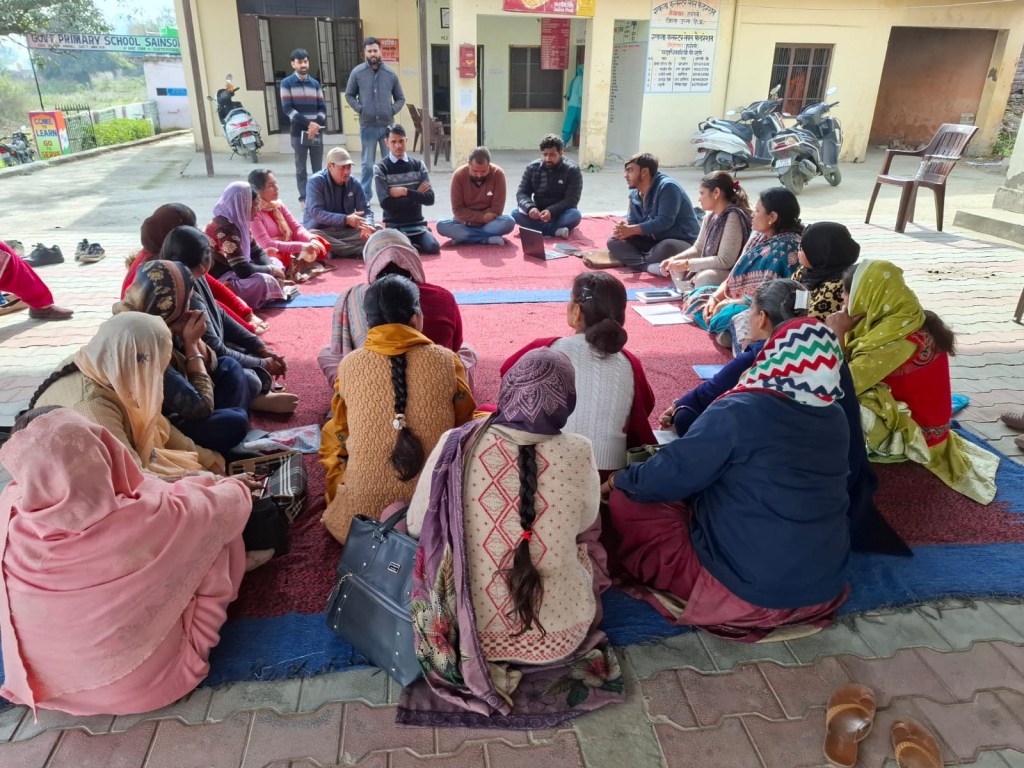
Interaction with SHG Women Members of Ekta CLF at Una, Himachal Pradesh
We then moved on to interact with the women SHG members. Many of them had taken assessments earlier, and we felt this would be a good opportunity to observe their experience once again. To simulate a realistic scenario, we created a short test on the staging portal, incorporating some questions that had been used in an earlier pilot activity.
After setting up the test, we generated a QR code and displayed it full-screen on a laptop so that everyone could scan the link and begin the assessment.
Within minutes, the room became lively. Women gathered around, adjusting their phones, opening camera apps, searching for QR scanning options, and trying to access the test. After some time, most of the members became busy answering the questions in the test. Once a while, a member would come up with a doubt. Me and the team tried our best to resolve them. I carefully watched the members as they gave the assessment.
I made some observations below based on my interaction with these women members-
- Many members struggled with basic QR code scan. They had to be told about the options available in their mobile to scan the code ( Settings option,Google lens, etc. )
- Some users struggle to click on the ‘consent’ button on the landing page . They were confused about the need to click it and wondered how to start the test.
- In some member’s mobile, when they closed the incomplete test and open again, the chosen options of the questions disappeared.
- Currently for a test with multiple pages, if a user misses a mandatory question on the page and clicks the “Next” button, a popup appears saying “Answer all mandatory questions” for that page. This confused some users, as they were unable to identify what exactly went wrong or why the next page is not opening.
- Many members had trouble understanding the vocabulary of the questions itself . It seemed the question creator had used very professional Hindi while creating questions and many words were unfamiliar to users who primarily speak a local dialect. This pointed out to scope of improvisation in the content too.
Finally, after a while most of the members completed the tests and finally it was time to bid farewell to everyone. The time spent in Una with Ekta CLF was brief but informative.

Interaction with officials and CLF members of Ekta Model CLF at Una, Himachal Pradesh

