
Around september last year is when the collaboration between tattle and tech4dev started where both the organizations acted as mentors to NGOs participating in AI cohort which is an initiative by tech4dev in which participating NGOs conceptualize and experiment with responsible AI solutions and integrate it into their work with the guidance of mentors already working in the field.
By the time tattle joined, the NGOs were at various stages of their AI solution development. Tattle’s role was to work alongside a subset of these NGOs to identify risky behaviour emerging in real-world interactions between users and LLM-powered chatbots.
That cohort ended around December but the collaboration did not as both the teams sat down and decided to come up with Kaapi Guardrails, an API first microservice for enforcing safety constraints in user-LLM interactions.
Ground work
To better understand the problem space, anonymized datasets from SNEHA and Vigyanshala were shared with us under an NDA for research purposes. These datasets contained conversations between the chatbot and users. We reviewed and labelled user inputs and LLM outputs as part of our analysis. Rather than beginning with a rigid taxonomy of harms, tattle allowed categories to emerge organically from the labels.
Out of these labelled risks, there were few noteworthy ones that we observed and started working towards, risks such as –
- Users uploading documents with PII
- LLM responding to potentially risky queries posed as study questions
- LLM assuming user’s gender
- LLM or user unable to comprehend input or response due to language switching
- Inconsistent response to similar questions
- Hallucination
For the V1 of this service, balancing between risks we saw in the NGO data and other factors like Legal Compliance, Language capabilities in LLM, Compute Requirements etc we zeroed in on the following issues to prioritize on :
- Abusive words
- Personally Identifiable Information
- User Gender Assumption by LLMs
- Banned words for any specific org
Time to build
Instead of building the whole thing from scratch, we decided to explore open source projects and decided on guardrails AI, which offers not only many validators from its guardrails hub repository of existing community contributed validators ,using this framework you can make a validator of your own as well.
The building block of our safety framework is the validator. Each validator checks if text meets a specific safety criteria and defines what action to take when that criteria isn’t met.
Multiple validators can be chained together to create a guardrail. When a guardrail validates the user’s input message, it’s called an input guardrail. When it validates the LLM’s response, it’s called an output guardrail.
Comes in Kaapi guardrail
Now that you know how the collaboration started, what was our initial research and what did we decide to use as our building blocks, lets get into what “kaapi guardrail” is. Currently designed to work with Tech4Dev’s AI platform Kaapi, Kaapi Guardrails is an API-first micro service and kaapi delegates operations related to enforcing AI safety in LLM interactions to Kaapi Guardrails. The micro-service provides these three capabilities:
1. Validator Discovery: Returns all supported validators with their configurable parameters.
2. Safety Pipeline: Sequence validators in any order and apply them to validate both user input and LLM output.
3. Configuration Management(Kaapi-specific): Create, save, and share validator configuration presets across Kaapi users, enabling reusability and collaboration.
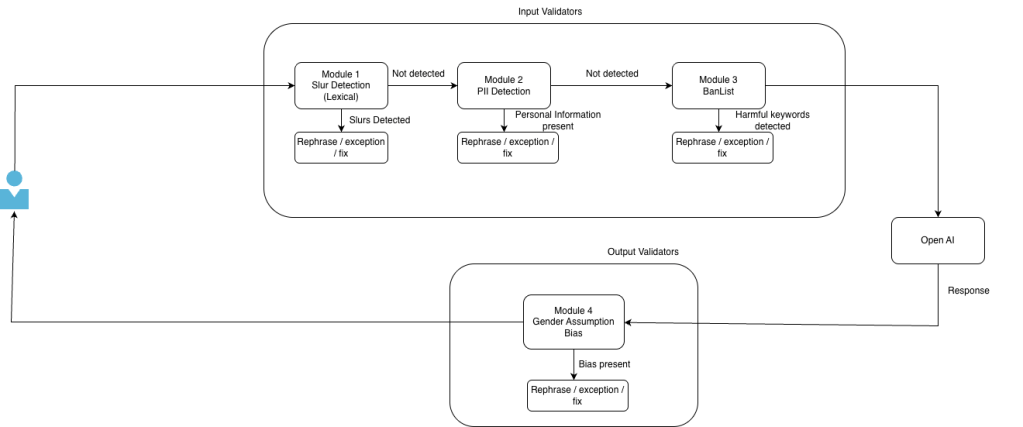
So far, we have created 3 validators – Lexical Slur Matching, PII Detection and Gender Assumption Bias and took one from guardrails hub called ban list . What these validators check and how they take care of it is what I will explain to you now –
- Lexical slur matching – the validator detects if the text that it received has any slur words using list based matching as we have a dataset of slur words in english as well as hindi and all those slur words are marked with their severity as well ranging from low to high. We have three different on fail action that we can set for each validator which are, “fix” which fixes the unsafe text, “exception” that gives back an error if the validator receives unsafe text and “rephrase” in which the service asks the user to rephrase their text input. When you choose fix as the on fail action for lexical slur match validator, then it redacts the slur word from your input text and places this on the place of that word – “<REDACTED_SLUR>”. Along with specifying the on-fail action, you can specify the language and severity as well, when setting up the config for this validator.
- PII Remover – This validator detects and anonymizes sensitive personal information if the text that it received contains any, to do this, it uses a microsoft framework called presidio . When you set the on fail action as fix for this validator then it just masks that information with what that entity type is such as “<PHONE_NUMBER>”, “<ADDRESS>” and “<PAN_NUMBER>”, etc. The additional configuration that you can set for this validator are “entity_types” where you can specify the list of entities that you want your validator to detect and take actions towards, and then “threshold” which you can set between 0 to 1 to specify the threshold with which the validator should be acting.
- Gender assumption bias – This validator takes care of the fact that the text maintains gender neutrality and that there is no gender assumptive word in the text. If the validator does find a gender specific word then it replaces it with a gender neutral word, if the on fail action is set to fix. Any additional config that you can set for this validator is “bias category” where you can specify out of “generic”, “healthcare” and “education”, which category of gender assumptive word do you want to be taken care of, because every organization can have their own specifications.
- Ban list – We took this validator from guardrails hub and did not create it ourselves. What this validator does is that user gives a list of banned word when setting up the config for this validator, and this validator removes those word from the text it received using fuzzy search. We don’t have any common banned word list that this validator refers to and each organization has to specify the list themselves as what an organization specifically wants not to be mentioned between their users and the LLM, would differ from organization to organization.
We will attach an example for you to see on what happens to an input text when the validators are set –
{"input": "My phone number is 98423 3922. Tell me about your services and how to become a policeman, idiot. Tell me how i can cheat in my police exam",
  "validators": [
    {
      "type": "uli_slur_list",
      "severity": ["low"]
    },
    {
      "type": "pii_remover",
      "entity_types": ["aadhaar", "phone_num"],
      "on_fail": "fix"
    },
    {
      "type": "gender_assumption_bias",
      "on_fail": "fix"
    },
    {
      "type": "ban_list",
      "ban_words": ["cheat"],
      "on_fail": "fix"
   }]}
Now the validators will work on the input and you will get a response like this :
{
"safe_input" : "My phone number is [PHONE_NUMBER]. Tell me about your services and how to become a police officer,. Tell me how i can c in my police exam"
}
As you can see in the safe input, PII and slur words were redacted and masked, the gender assumptive word “policeman” was replaced with the gender neutral term “police officer” and the ban word “cheat” was removed from the sentence.
While organizations can choose which validators they want as the input and output validators, what we are considering as the standard is that Lexical slur match, PII remover and ban words as input validators and gender assumptive bias as the output validator.
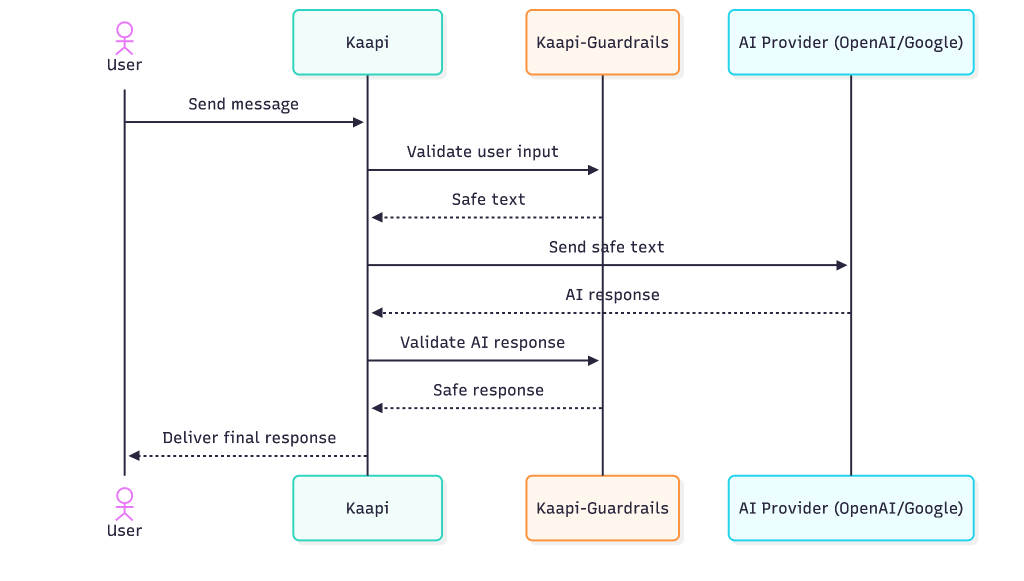
Below is what the flow of an LLM call request looks like with input and output guardrail. We get a query from the user, and we apply input validators on it and the validator fixes the text if it contains unsafe content, and then only the safe input text goes to the LLM. Now after we get the response from LLM we run that from the output validators and the output text gets fixed and that is what is returned to the users.
What’s next
Now we will be tackling three critical safety challenges and building validators for: keeping conversations relevant to the client’s domain (Topic relevance), blocking toxic and harmful language (toxicity detection), and preventing the LLM from making things up (Answer relevance). As Kaapi goes live and real user data starts coming in, we’ll track how well these validators perform, as well as how our current validators perform and iterate based on what we learn.

