Every product starts with the same goal:
Ship quickly, validate ideas, and learn from real users.
Kaapi was no different.
In the beginning, we optimised for speed. The infrastructure was intentionally simple because our focus was on building features rather than building the “perfect” architecture. That approach helped us move quickly and validate the product.
As Kaapi grew, however, the infrastructure had to evolve alongside it. AI workloads increased, background processing became more complex, and production started demanding stronger security, better isolation, and higher reliability.
Instead of redesigning everything at once, we approached the problem in phases:
- V1 focused on making the infrastructure secure and production-ready.
- V2 focused on improving scalability, background processing, and operational reliability.
This post walks through that journey and the engineering decisions behind each change.
What You’ll Get From This Blog
By the end, you will understand:
- Why we redesigned Kaapi’s infrastructure after the MVP phase.
- How we improved security by isolating staging and production.
- Why RabbitMQ and Redis were given dedicated instances per environment.
- How RabbitMQ, Celery, and Redis work together in Kaapi’s pipeline.
- Why we redesigned our background processing architecture.
- The reasoning behind each decision — not just what changed, but why.
Where We Started
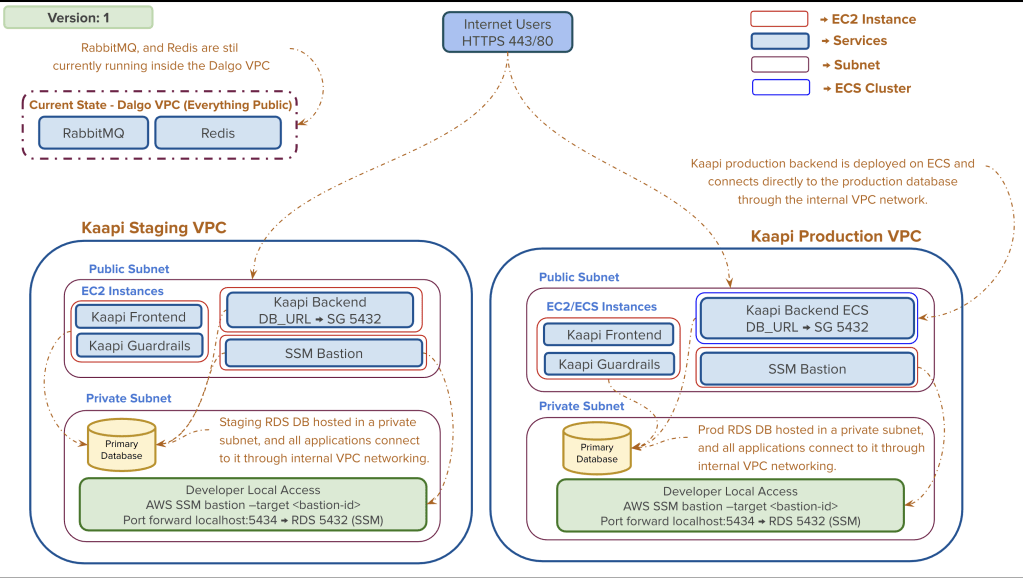
When Kaapi was still in its MVP stage, the infrastructure was intentionally lightweight. Some services ran inside Kaapi VPCs, while others still lived inside the Dalgo VPC (Dalgo being a separate product and team whose infrastructure we shared early on).
This helped us deploy features quickly and avoid unnecessary complexity early on. But as the product matured, the same architecture started showing its limitations.
The problems we ran into:
- Production and staging weren’t completely isolated — any misconfiguration in one environment could potentially affect the other.
- RabbitMQ and Redis were shared between environments — this increased the risk of cross-talk and made configuration management error-prone over time.
- Some services still relied on public networking — not ideal for a production-grade platform.
- Infrastructure ownership was split across different VPCs — making operational management fragmented and harder to reason about.
None of these issues were individually blocking. But together, they made it clear that the infrastructure needed to mature alongside the product.
V1 — Building a Secure, Production-Ready Foundation
Rather than introducing new technologies, V1 focused on improving the existing architecture. The goal was to strengthen the platform through better infrastructure ownership, networking, and security.
Moving Everything Under Kaapi VPC
The biggest structural change was bringing all infrastructure under dedicated Kaapi VPCs. Previously, ownership was fragmented across the Dalgo VPC. Consolidating everything under Kaapi’s own VPCs immediately improved networking clarity, routing, and operational management.
Making the Database Private
The next major improvement was redesigning how PostgreSQL was deployed. We migrated it into private subnets and introduced an AWS SSM Bastion Host for operational access.
After the migration:
- Backend services communicate with PostgreSQL entirely over private networking.
- Developers connect securely through AWS Systems Manager (SSM) – a managed service that provides a secure tunnel without exposing any public endpoint.
- Public database access was completely removed.
This significantly strengthened the platform’s security posture and set a pattern we’d carry into V2.
V2 — Scaling Background Processing
With V1’s security and networking improvements in place, a new set of challenges became visible: user-facing AI requests were queuing behind slower background jobs. That shifted our focus from infrastructure security to workload execution and scalability.
How Background Processing Works in Kaapi
Before getting into the V2 changes, it helps to understand how Kaapi’s background pipeline is structured. Three components work together:
RabbitMQ acts as the message broker. Whenever the backend creates a background task using task.delay(), Celery serializes it and pushes it into a RabbitMQ queue. RabbitMQ holds tasks, manages queues, routes work to available workers, and respects task priorities. In short, it decides which task gets processed next.
Celery is the distributed task framework that listens to RabbitMQ. When a worker picks up a task, it executes it and closes the loop — in Kaapi’s case, the worker itself handles the callback to the client. Tasks in Kaapi are fire-and-forget from the backend’s perspective; the backend hands off the work and moves on.
Redis acts as Celery’s result backend, storing task status (success/failure), return values, and exceptions if any occur. It has no role in queue management or task routing — it simply stores outcomes.
If you’d like a deeper introduction to Celery, the official docs are a good starting point. Here we’ll focus on how we use and evolve this stack specifically for Kaapi.
Separating RabbitMQ and Redis Per Environment
One of the first V2 improvements was giving each environment its own RabbitMQ and Redis instances. The shared setup had worked fine early on, but as both environments became more active, managing them on the same infrastructure became increasingly error-prone.
We provisioned dedicated instances for each environment:
- Production RabbitMQ & Redis run inside the Kaapi Production VPC.
- Staging RabbitMQ & Redis run inside the Kaapi Staging VPC.
Each environment now operates with complete independence, making future maintenance and debugging significantly simpler.
Simplifying the Celery Queue Architecture
Originally, we designed the queue system with multiple queues — default, high, medium, and low priority — with the plan to assign separate workers to each as traffic grew. The idea was that high-priority queues would have more consumer workers, ensuring those tasks saw lower latency.
In practice, we ran all queues on a single worker to manage costs. And this revealed a deeper issue: RabbitMQ only respects task priorities within the same queue. Tasks in a “high” queue don’t automatically get processed before tasks in a “low” queue — priority only matters when tasks compete inside the same queue. So our multi-queue setup wasn’t giving us the prioritization we’d intended.
We also realized we had over-engineered for traffic levels we hadn’t reached yet. So we simplified.
Instead of maintaining multiple queues, every task now enters a single priority-enabled queue. Each task carries its own numeric priority. RabbitMQ uses that to ensure high-priority work always moves ahead of lower-priority jobs — as long as workers are free to pick it up.
The tradeoff worth understanding: With multiple queues and dedicated workers, we can guarantee that high-priority tasks are always picked up quickly — but if there’s a sudden spike in low-priority tasks, those workers sit idle while fewer low-priority workers get overwhelmed. With a single shared queue, all workers are flexible and utilization stays efficient, but if workers are already busy running long low-priority tasks, even a high-priority task queued up behind them has to wait — priority only determines order in the queue, not preemption of an already-running job.
For our current traffic levels, the single-queue approach gives us the right balance of simplicity and performance.
Adding One More Celery Worker Service
With the queue architecture simplified, we turned to another bottleneck: the Backend API and Celery workers were deployed inside the same service, sharing the same CPU and memory.
During heavy background job periods, this created resource contention. Celery workers consumed available CPU, which slowed down API response times — even for users making simple requests.
Rather than just scaling up the entire service, we separated responsibilities.
We now run two Celery workers:
- A lower-concurrency worker (concurrency: 4) runs alongside the backend service.
- A dedicated high-concurrency worker (concurrency: 8) runs as its own independent service.
Both consume from the same queue, so any of the 12 total forks (4 + 8) can pick up any job — there’s no routing of specific task types to specific workers.
The reason for co-locating a worker with the backend comes down to resource utilization. The backend process is generally lightweight — it’s designed to receive API requests and hand off long-running work to Celery. But during traffic spikes, it can briefly need more CPU and RAM, so its container is provisioned with extra headroom. During quieter periods, those resources would otherwise sit idle. By placing a lower-concurrency Celery worker alongside it, we put that spare capacity to use for processing async tasks — without needing a separate service for it.
Securing the RabbitMQ Management Console
Previously, RabbitMQ’s Management Console was accessible through a public endpoint. While access was restricted, exposing an operational interface publicly wasn’t ideal.
We removed public access entirely. Developers now connect through the same AWS SSM Bastion Host model introduced for PostgreSQL in V1, keeping the operational access pattern consistent across the platform.
Where We Are Today
After both infrastructure iterations, Kaapi looks very different from where it started — fully owned VPCs, isolated environments, private databases, independent message queues, and a background processing setup that can scale without touching the API layer.
We didn’t do any of this upfront. Each change came from hitting a real limit.

Final Thoughts
If there’s one thing this process reinforced — don’t over-engineer early. Our MVP infrastructure was scrappy, and that was the right call at the time. We fixed things as they actually broke, not before.
V1 made the platform secure enough for production. V2 made background processing fast enough to keep up with AI workloads. Both felt overdue by the time we got to them, which is probably a sign we got the timing roughly right.
There’s more to do — but that’s a post for another day.